Desktop FAQ
1. Frequently asked questions when integrating
1.1 What is the minimum environment configuration required for the integrated desktop version of PhizClip?
A: The SDK is based on qt 5.15 and the Chromium Embedded Framework and supports the following systems Windows:
- Windows 10
- Windows 8.1
- Windows 7
Macos:
- Macos 10.13
1.2 Languages supported by PhizClip for desktop
A: The SDK provides headers, libs and dll files for all languages on the .net platform in theory. We also have DEMO's available in various languages for your reference.
2. Safety instructions
2.1 Safety overview
In terms of overall capabilities, the PhizClip applet SDK provides a closed and secure environment for business code to run in, effectively preventing risks such as interference from external code and data leakage.
The host of a third-party web platform can only start the runtime through an interface that is actively exposed by the SDK.
The SDK has full control over the operating environment required for the business application and the external communications required, and can ensure that network communications are not intercepted or interfered with through a variety of mechanisms.
The PhizClip applet SDK desktop version uses the Chromium Embedded Framework browser kernel, the running environment is completely isolated from the system browser, based on this browser kernel can achieve better data isolation and data protection.
2.2 PhizClip Applet SDK Security Sandbox SDK Feature Highlights
The PhizClip applet SDK has five key features: security, compliance, regulatory control, scalability and future-proofing.
- Security and confidentiality: PhizClip applet SDK provides a secure execution environment for securities firms' business applications on third-party web platforms, protecting business applications from interference and eavesdropping by third-party web platforms.
- Regulatory control: During the business development phase, PhizClip applet SDK can report data to the designated industry platform of the regulator according to the regulatory requirements, and can support to take down the applet and suspend the illegal rental business at any time according to the regulatory requirements.
- Compliance tracking: The PhizClip applet SDK meets all the compliance tracking requirements of securities firms, such as the SDK's ability to collect IMEI, MAC or other hardware fingerprints of devices (for transaction tracking) and report the data to a platform designated by the regulator.
- Easy to extend: To meet various forms of business requirements, the SDK supports the extension of the SDK's capabilities in the form of plug-ins while ensuring security, such as the ability to inject dual recording video into the SDK via a business plug-in.
- Future-proof: both securities and information technology are rapidly changing and evolving industries, and the needs and forms of business are constantly being innovated. Therefore, the PhizClip Applet SDK, as a business host, is in line with technological trends and is conducive to ecological development.
3. Description of the architecture
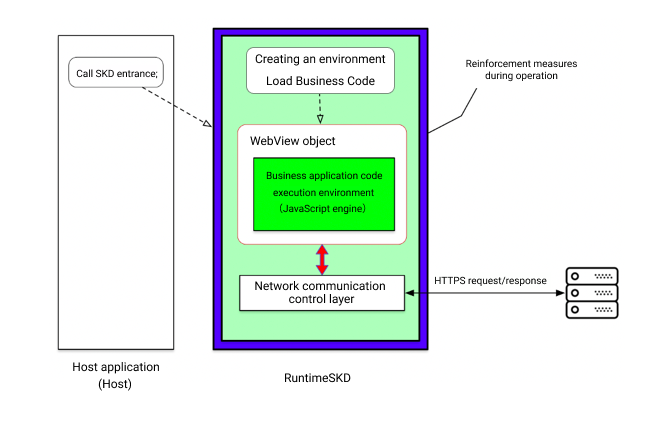 As shown in the architecture diagram, the PhizClip applet SDK consists of four main components: the application interaction layer, the security protection, the network communication control and the secure operation container.
- Application Interaction Layer: The application interaction layer is designed to enable business applications to be opened and to complete data interaction and sensory reporting with the operating platform of the regulator's designated agency.
- Security protection: The security protection component provides security protection, detects whether the runtime environment is secure and exits the business if it is detected to be dynamically debugged, preventing data or business logic from being maliciously cracked.
- Network Communication Control: The Network Communication Control component controls network access to the applet. The component supports functions such as black and white lists and can block non-whitelisted access requests.
- Secure Run Container: The Secure Container component provides the runtime environment for the applet, which is rendered using a native web rendering kernel to ensure that the business processing logic of the module is completely isolated from the host.
4. Get the DEMO
You can get the C++ applet DEMO by clicking here