iOS integration
Integration sample code
We provide a style DEMO project that includes "Phiz Login, PhizPay, Gaode Map, Baidu Map", developers can get the integration sample code here ios-sample-demo If you do not have access to Github in your environment, you can also visit the gitee mirror repository by clicking here.
1. Get applet credentials
To use the SDK you need to apply for the SDK KEY and the SDK SECRET. Only if the correct SDK KEY and SDK SECRET are configured during the initialisation of the SDK will it work.
1.1 Creating applications
Registered users need to log in to "App Management - New Partner App" to complete app creation;
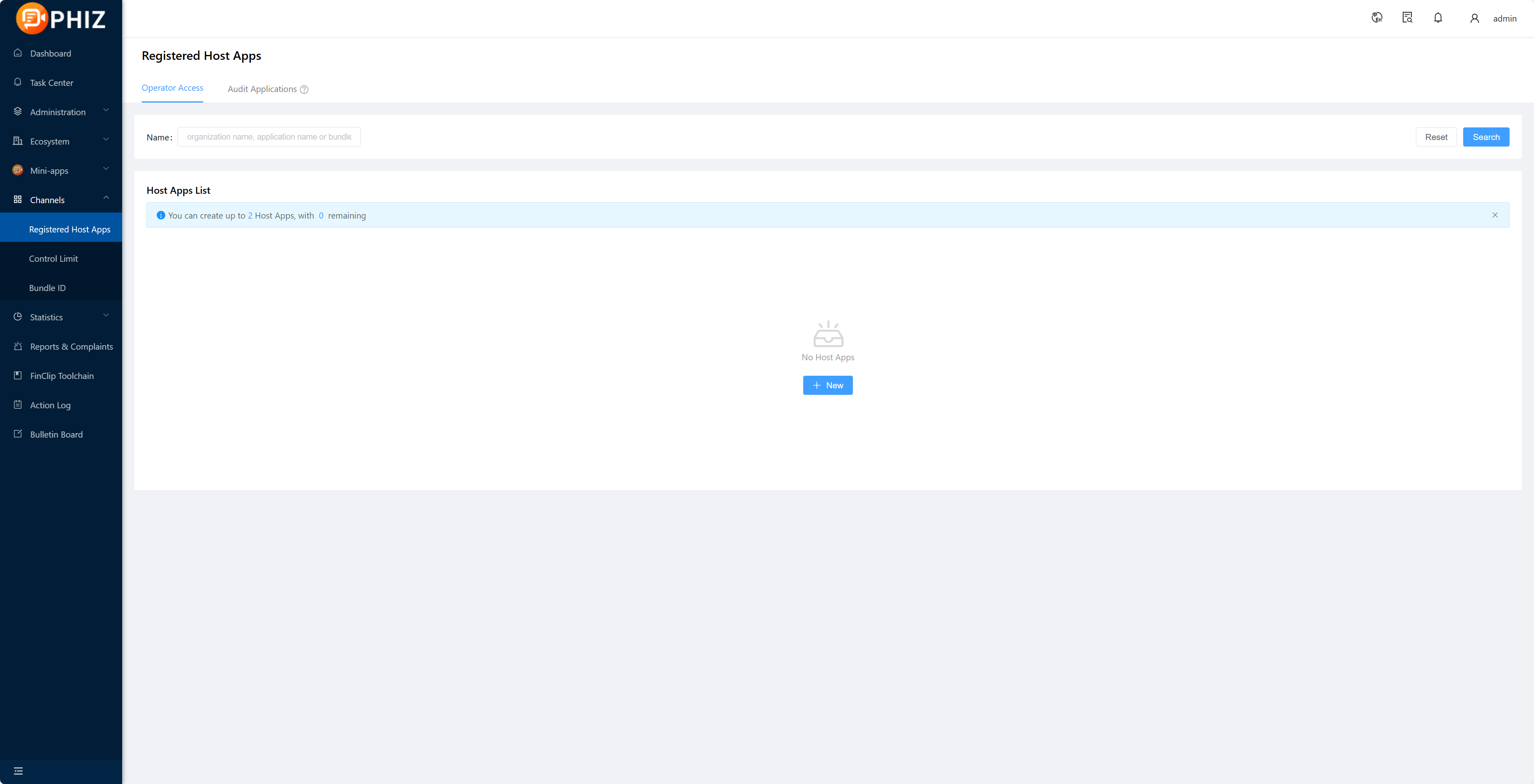
1.2 Obtaining SDK KEY and SDK SECRET
After creating the app and adding the Bundle ID, if you need to export the corresponding SDK KEY and SDK SECRET, please select Copy' after the corresponding Bundle ID to paste the operation via Ctrl+VorCommand+V`;
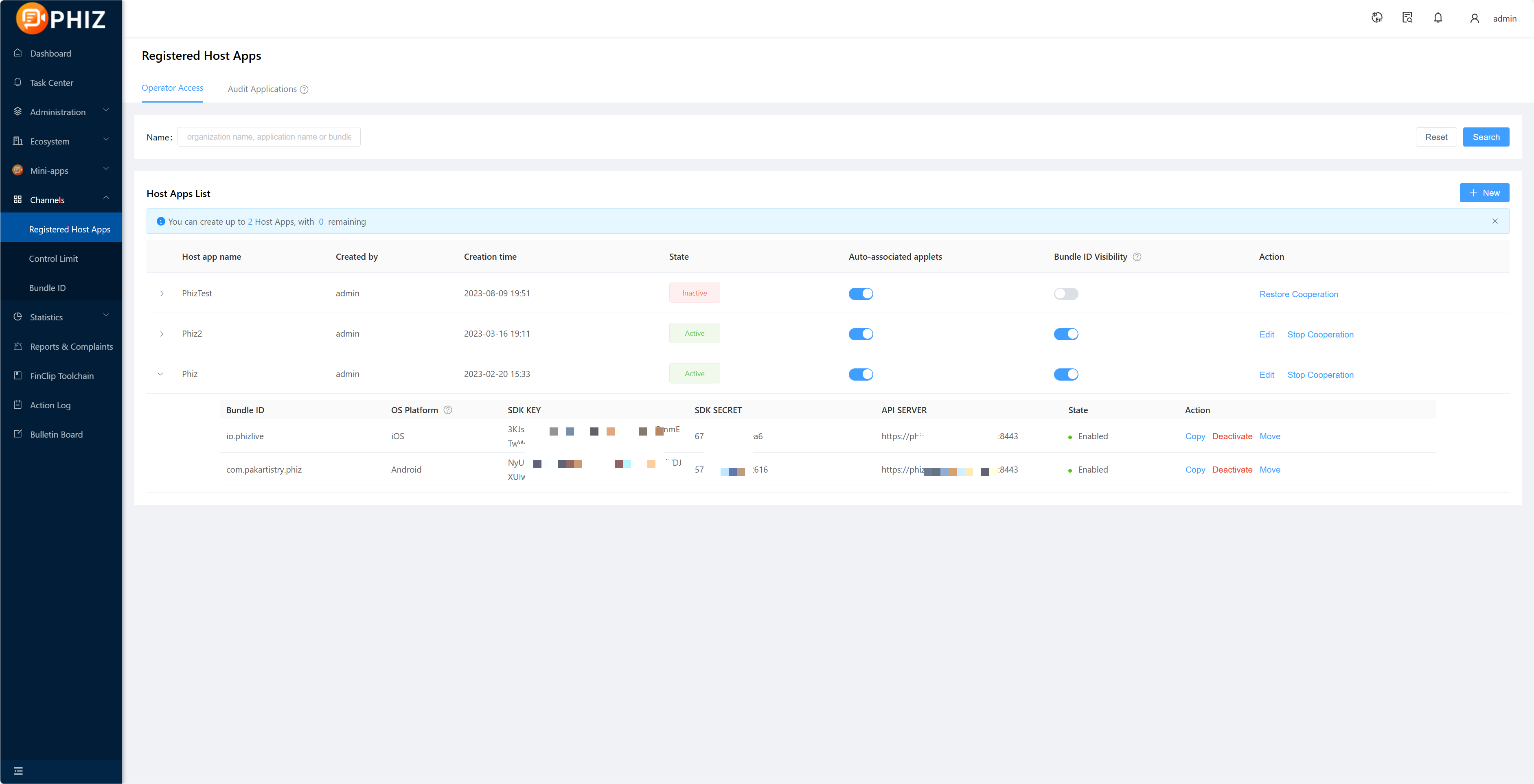 Of which.
- SDK KEY: This is the credential for the partner application to use the applet SDK. If the SDK KEY fails, all APIs of the SDK will not be available.
- SDK SECERT: is the security certificate for accessing the service, do not give it to third parties.
Tips
For details on creating applications and obtaining the SDK KEY and SDK SECRET, see the [Introduction - Access Guide - Enterprise Access Guide - 7. 94%E7%A7%BB%E5%8A%A8%E5%BA %94%E7%94%A8) section.
2. Integration SDK
The PhizClip applet SDK currently supports pod integration or manual integration.
2.1 Pod integration
2.1.1 Installing the pod environment
Cocoapods provides a very simple dependency management system to avoid the errors generated by manual imports. If you have not installed Cocoapods before, you can check out the Official Installation Guide (English) or the CocoaPods Installation Tutorial(Chinese).
sudo gem install cocoapods
pod setup
2.1.2 Creating Podfile files
Note
Starting from 2.8.5 version, the PhizClip applet SDK is split into several SDKs: FinApplet (core SDK), FinAppletExt, FinAppletBDMap, FinAppletGDMap, FinAppletWebRTC, FinAppletBLE, FinAppletAgoraRTC, FinAppletContact, FinAppletClipBoard, FinAppletWXExt. Only FinApplet is required, the other extension SDKs can be integrated as appropriate.
If you don't need to use the extension SDK, then just rely on FinApplet in the podfile. If you need to use the API in the extension SDK, then you also need to rely on FinAppletExt.
- When you are using the functionality of the
Mapcomponent, you can refer toFinAppletBDMap (Baidu Maps)orFinAppletGDMap (Gaode Maps)if you want to use a three-way map to implement it, or by default, the native map. - If you need to use WebRTC functionality in your applet, you can add the
FinAppletWebRTCdependency to thepodfile, which is our secondary wrapper library based on theGoogle WebRTC library, supportingiOS9and above. - If Bluetooth functionality is required in the applet, add the
FinAppletBLEdependency to thepodfile. - If
live-pusher,live-playerfunctionality is required in the applet, add theFinAppletAgoraRTCdependency to thepodfile. - If you need to use
addPhoneContactin the applet to add mobile contacts, add theFinAppletContactdependency to thepodfile. - If clipboard functionality is required in the applet, add the
FinAppletClipBoarddependency to thepodfile. - If you need to access Phiz's login, payment and user information capabilities in your applet, you can add the
FinAppletWXExtdependency to yourpodfile.
Note
When using FinAppletWXExt, you need to follow the WeChat Access Guide - iOS Access Guide for configuration, as follows.
- configure the application's
Universal Links. - turn on the
Associated Domainsswitch and add theUniversal Linksdomain name to the configuration. - in the project's Target -> [Info] -> [URL Types], add a new
URL Schemes(key for weixin, value for wx+Appid applied in Weixin). - Add the application access whitelist
LSApplicationQueriesSchemesto the projectinfo.plist, corresponding to the values to be filled in asPhiz,weixin,weixinULAPI. Remember to checkAssociated Domainsin the Apple Developer CenterApp ID Configuration.
In the root directory of the Xcode project, create a new Podfile file and add the dependency on the applet SDK in the Podfile file as follows.
pod 'FinApplet'
pod 'FinAppletExt'
pod 'FinAppletBDMap'
pod 'FinAppletGDMap'
pod 'FinAppletWebRTC'
pod 'FinAppletBLE'
pod 'FinAppletAgoraRTC'
pod 'FinAppletContact'
pod 'FinAppletClipBoard'
pod 'FinAppletWXExt'
Podfile example.
platform :ios, "9.0"
inhibit_all_warnings!
target "FinoAppletDemo" do
 pod 'FinApplet'
end
post_install do |installer|
 installer.pods_project.targets.each do |target|
 target.build_configurations.each do |config|
 config.build_settings['ENABLE_STRICT_OBJC_MSGSEND'] =
'NO'
 config.build_settings['APPLICATION_EXTENSION_API_ONLY']
= 'NO'
 end
 end
end
2.1.3 Installing or updating dependencies
Then, run pod update or pod install.
2.1.4 Opening a project
After executing pod update or pod install, open the project directory, find the xxx.xcworkspace file and double click to open it.
2.2 Manual integration
To make it easier for developers to get up and running quickly and to use the emulator for development and debugging, our SDK includes the x86_64 architecture, so be sure to remove the x86_64 architecture before putting it on the AppStore. You can remove it yourself manually, or you can find a script online to remove it yourself, or you can configure a script for your project according to 3.2.4. You can still use the simulator for development and debugging, but when you archive, the simulator architecture will be removed automatically. Of course, you can also specify that you only need the real machine architecture, so we will only deliver the SDK with the real machine architecture.
Note
Since both Baidu Map and Gaode Map are static libraries, either FinAppletBDMap (Baidu Map) or FinAppletGDMap (Gaode Map) is also a static library.
2.2.1 Integration steps
2.2.1.1 Adding the SDK to the project Drag the FinApplet.framework into the project. 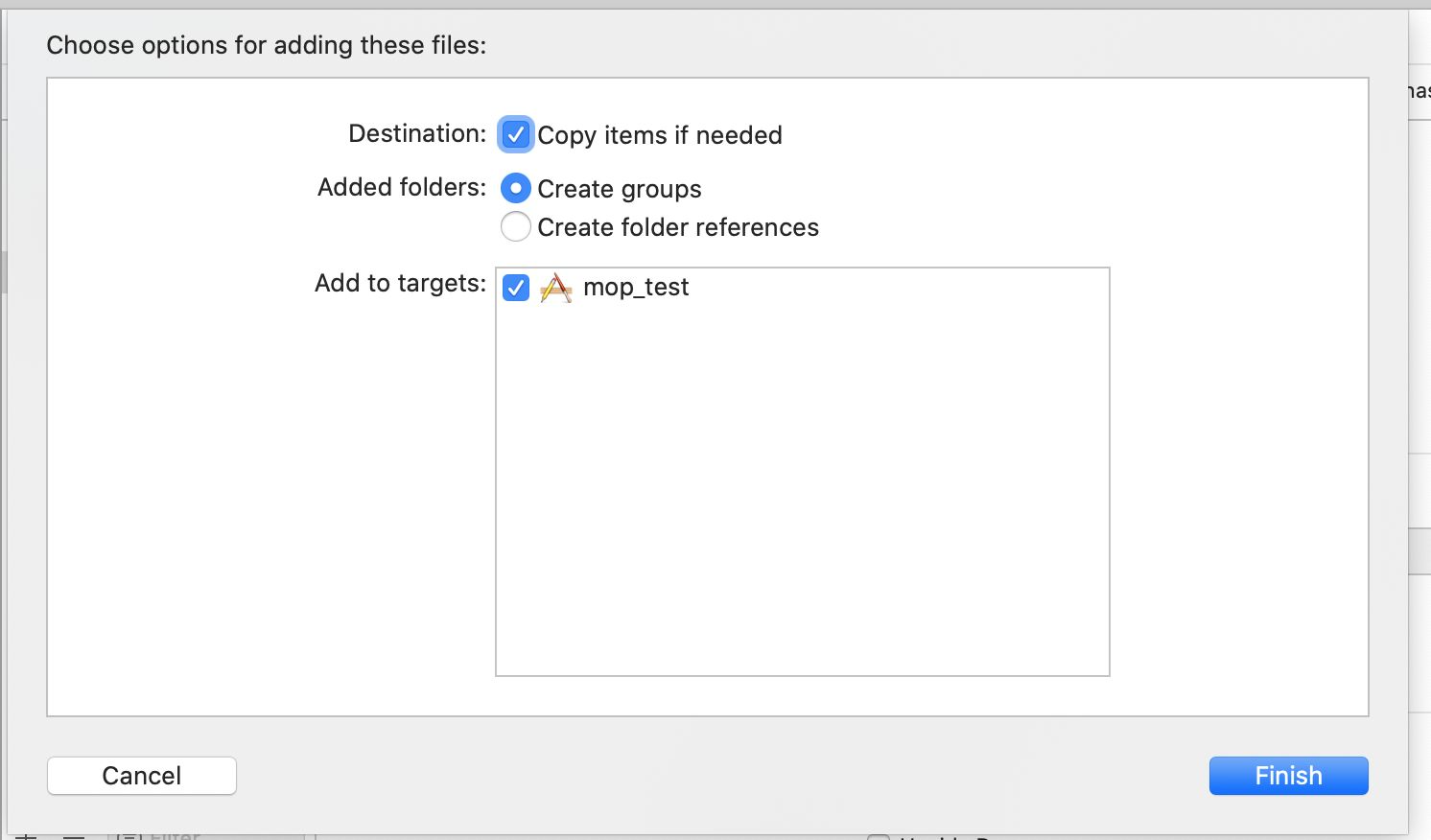 Of course, if you need to use the APIs in
 FinAppletExt, FinAppletWebRTC, FinAppletBLE, FinAppletAgoraRTC, FinAppletContact, then you also need to add the FinAppletExt. framework, FinAppletWebRTC.framework, FinAppletBLE.framework, FinAppletAgoraRTC.framework, FinAppletContact.framework, FinAppletClipBoard.framework are also dragged into the project.
2.2.1.2 Modifying the project configuration
If you want to use the same configuration, you need to do the following: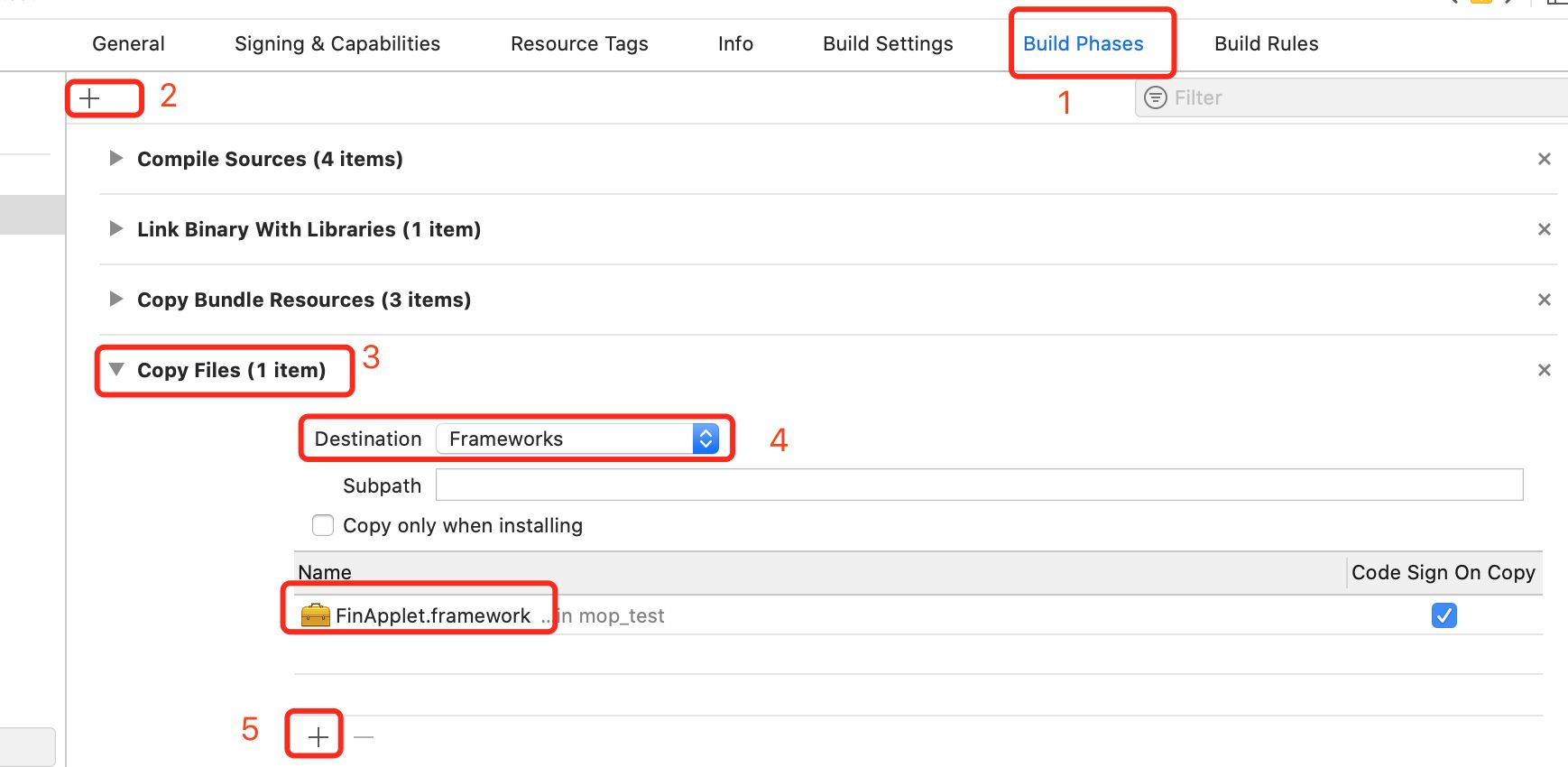 If you need to use
 FinAppletExt, FinAppletWebRTC, FinAppletBLE, FinAppletAgoraRTC, FinAppletContact, FinAppletClipBoard, FinAppletGDMap framework, FinAppletBDMap.framework, then you also need to add the corresponding framework to the Copy Files as well.
Note
FinAppletWebRTC.frameworkis a secondary package based on Google's WebRTC library, so you also need to import the GoogleWebRTC library (requires scientific internet access), if you cannot download it due to network problems you can also download GoogleWebRTC library.FinAppletGDMap.frameworkis a secondary package based on Gaode Map SDK, the integration needs to import Gaode MapAMap3DMap-NO-IDFA,AMapLocation-NO-IDFA,AMapSearch-NO-IDFAwhich are 3 SDKs,2.37 .9and above can use the latest9.40version, versions before2.37.9need to use Gaode Map9.4.0version, you can go to Gaode Map official website to download the relevant SDK;.FinAppletBDMap.frameworkis a secondary package based on Baidu Map SDK, you need to integrate and import the 3 SDKsBMKLocationKit,BaiduMapKit/MapandBaiduMapKit/Search, you can go to Baidu Map official website to download the relevant SDKs.FinAppletAgoraRTC.frameworkis a secondary package based on the SoundNet SDK, which can be downloaded from SoundNet and imported into the project.FinAppletWXExtis a secondary package based on Phiz Terminal SDK, you can go to WeChat Open Platform to download the sdk package and import it into your project.
2.2.1.3 Opening the project Double click on xxxx.xcodeproj to open the project. 2.2.1.4 Configuring the archive script The applet SDK includes an x86_64 architecture to allow us to debug with the emulator when developing. However, the SDK with the x86_64 architecture will report an error when packaging and uploading to the app market, so configuring a script that automatically removes the emulator architecture when packaging will allow us to both develop and debug with the emulator and submit to the app market properly. Of course, you can also ask us for an SDK that does not include an emulator.<br 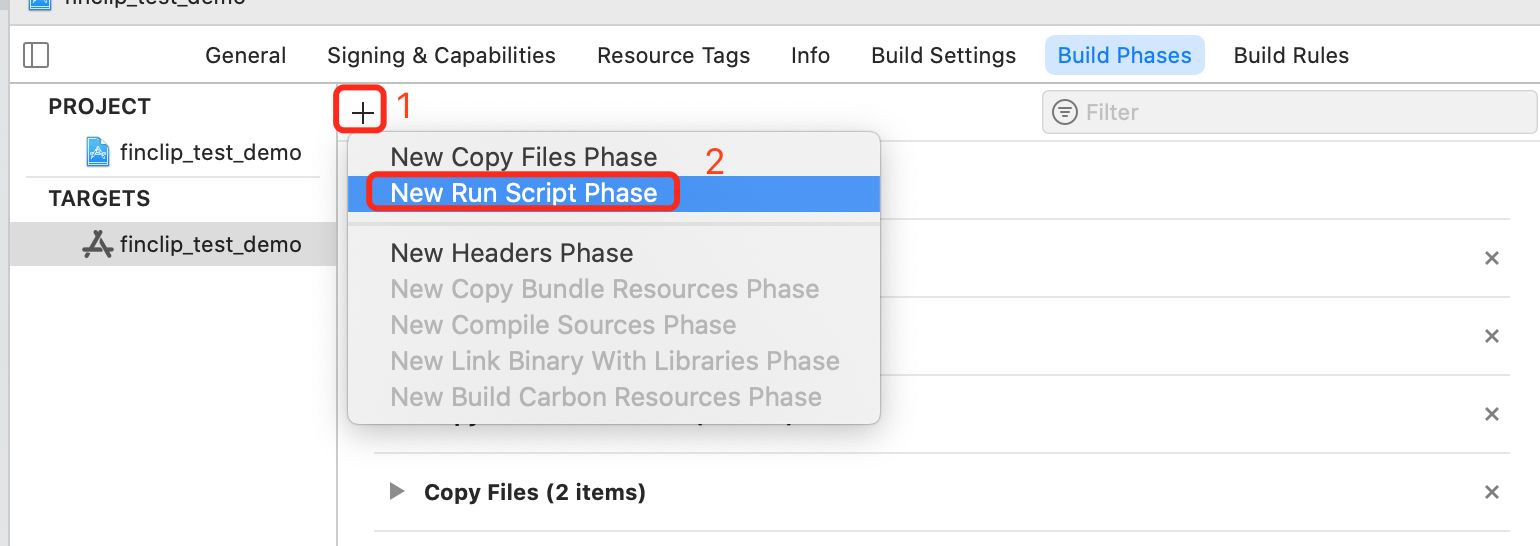
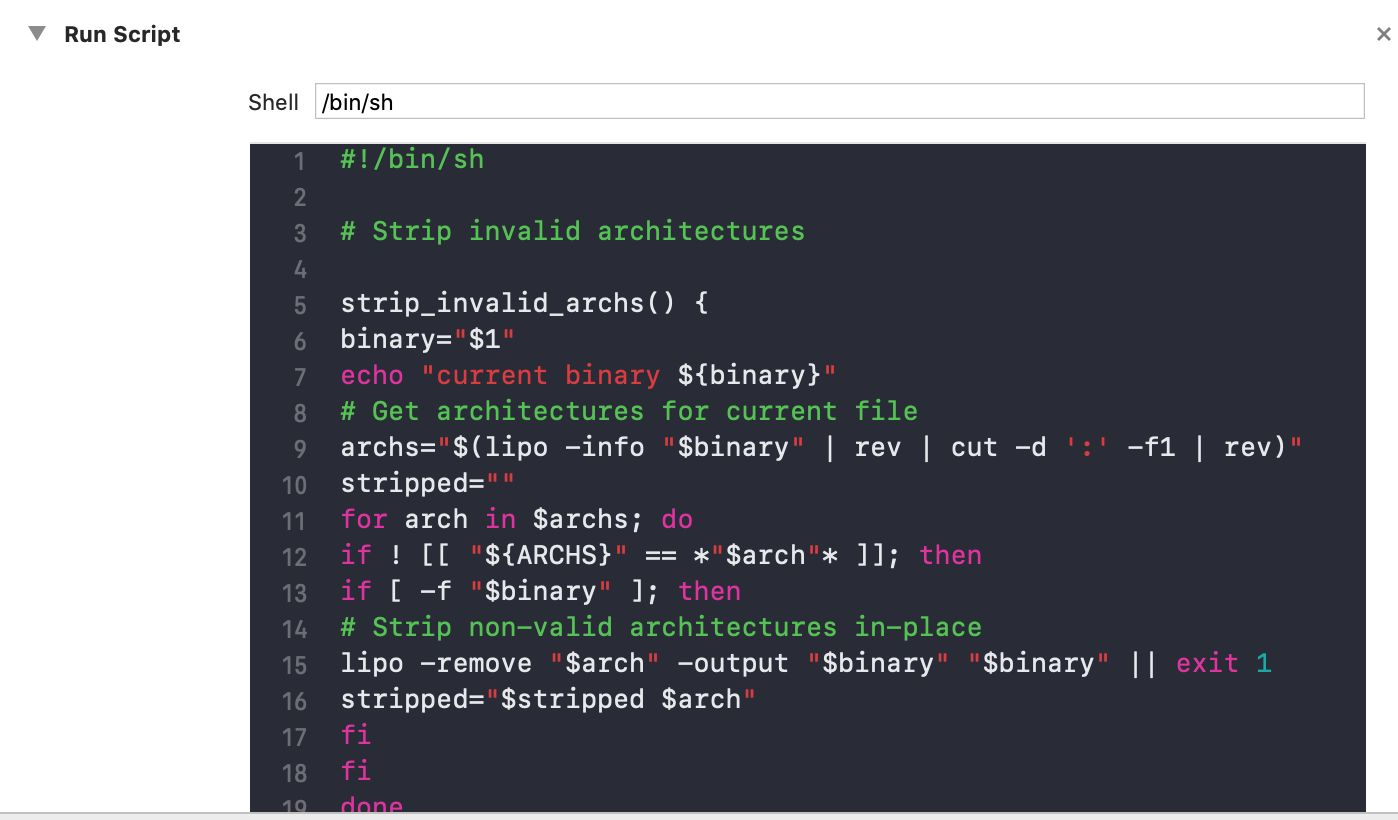 The script reads as follows.
#! /bin/sh
# Strip invalid architectures
strip_invalid_archs() {
binary="$1"
echo "current binary ${binary}"
# Get architectures for current file
archs="$(lipo -info "$binary" | rev | cut -d ':' -f1 | rev)"
stripped=""
for arch in $archs; do
if ! [[ "${ARCHS}" == *"$arch "* ]]; then
if [ -f "$binary" ]; then
# Strip non-valid architectures in-place
lipo -remove "$arch" -output "$binary" "$binary" || exit 1
stripped="$stripped $arch"
fi
fi
done
if [[ "$stripped" ]]; then
echo "Stripped $binary of architectures:$stripped"
fi
}
APP_PATH="${TARGET_BUILD_DIR}/${WRAPPER_NAME}"
# This script loops through the frameworks embedded in the
application and
# removes unused architectures.
find "$APP_PATH" -name '*.framework' -type d | while read -r
FRAMEWORK
do
FRAMEWORK_EXECUTABLE_NAME=$(defaults read
"$FRAMEWORK/Info.plist" CFBundleExecutable)
FRAMEWORK_EXECUTABLE_PATH="$FRAMEWORK/
$FRAMEWORK_EXECUTABLE_NAME"
echo "Executable is $FRAMEWORK_EXECUTABLE_PATH"
strip_invalid_archs "$FRAMEWORK_EXECUTABLE_PATH"
done
Please note. If after integration you run the simulator and get the following error: Building for iOS Simulator, but the linked and embedded framework 'FinApplet.framework' was built for iOS + iOS Simulator. then you need to Modify it as follows. Solution. After changing Validate Workspace to Yes as shown below, it will recompile and pass; after that you can change it back to NO and it will not report an error. ! image.jpg

2.3 Swift project integration with OC third-party libraries
If your project is written in Swift, integrating OC third-party libraries requires additional configuration.
- If you have never added an OC file to your project, when you create a new OC file, you will be asked if the bridge file is automatically generated, click
Create Bridge Headerto generate the header file. ! image.jpg - If your project has added OC files but no bridging file has been generated, you need to create a new Header manually by yourself, named
"{target name-Bridging-Header.h}", e.g."SwiftDemo-Bridging-Header.h". And in the Build Settings option in the project's targets, find the Objective-c Bridging Header option and set this to the .h file you just created, e.g."SwiftDemo/SwiftDemo-Bridging-Header.h". (where SwiftDemo is the target name) ! image.jpg - add a line of code to this file.


#include <FinApplet/FinApplet.h>The Swift project can then use FinApplet's OC third-party library.
3. add description of permission
Integrate the responsive SDK according to your actual needs and add permission configuration to the project info.plist file
If you integrate all SDKs, the permissions that need to be configured include: album, camera, microphone, location, Bluetooth.
| Permission name | KEY of the permission |
|---|---|
| Album Reading | NSPhotoLibraryUsageDescription |
| Album Writing | NSPhotoLibraryAddUsageDescription |
| Camera | NSCameraUsageDescription |
| Microphone | NSMicrophoneUsageDescription |
| Location | NSLocationAlwaysAndWhenInUseUsageDescription, NSLocationAlwaysUsageDescription, NSLocationWhenInUseUsageDescription |
| Bluetooth | NSBluetoothAlwaysUsageDescription, NSBluetoothPeripheralUsageDescription |
| Address Book | NSContactsUsageDescription |
The permissions involved in each of these SDKs are as follows (you can choose to integrate them as appropriate). of which the core SDK (FinApplet) is involved in the permissions:
| Permission name | KEY of the permission | API of the permission |
|---|---|---|
| albumReading | NSPhotoLibraryUsageDescription | chooseImage, chooseVideo |
| Album writing | NSPhotoLibraryAddUsageDescription | saveImageToPhotosAlbum, saveVideoToPhotosAlbum |
| Camera | NSCameraUsageDescription | scanCode, chooseImage, chooseVideo, CameraContext(Camera component) |
| Microphone | NSMicrophoneUsageDescription | chooseVideo,CameraContext(Camera component) |
Note
When recording a video, the system accesses the camera and microphone permissions in turn.
Permissions involved in the extension SDK (FinAppletExt):
| Permission name | KEY of the permission | API of the permission |
|---|---|---|
| Microphone | NSMicrophoneUsageDescription | startRecord, RecorderManager |
| location | NSLocationAlwaysAndWhenInUseUsageDescription, NSLocationAlwaysUsageDescription, NSLocationWhenInUseUsageDescription | chooseLocation, getLocation, openLocation, choosePoi |
Extension SDK-WebRTC (FinAppletWebRTC) permissions involved:
| Permission name | KEY of the permission | API of the permission |
|---|---|---|
| camera | NSCameraUsageDescription | webrtc-video component |
| microphone | NSMicrophoneUsageDescription | webrtc-video component |
Extension SDK-BDMap (FinAppletBDMap) permissions involved:
| Permission name | KEY of the permission | API of the permission |
|---|---|---|
| Location | NSLocationAlwaysAndWhenInUseUsageDescription, NSLocationAlwaysUsageDescription, NSLocationWhenInUseUsageDescription | Map component |
Extension SDK-GDMap (FinAppletGDMap) permissions involved:
| Permission name | KEY of the permission | API of the permission |
|---|---|---|
| Location | NSLocationAlwaysAndWhenInUseUsageDescription, NSLocationAlwaysUsageDescription, NSLocationWhenInUseUsageDescription | Map component |
Permissions involved in the extension SDK-BLE (FinAppletBLE):
| Permission name | KEY of the permission | API of the permission |
|---|---|---|
| Bluetooth | NSBluetoothAlwaysUsageDescription, NSBluetoothPeripheralUsageDescription | Bluetooth-General, Bluetooth-Low Power Central Device, Bluetooth-Low Power Peripheral Device, Bluetooth-Beacon some api |
Permissions involved in the extension SDK-AgoraRTC (FinAppletAgoraRTC):
| Permission Name | KEY of Permission | API of Permission |
|---|---|---|
| Camera | NSCameraUsageDescription | live-pusher,live-player |
| component | ||
| Microphone | NSMicrophoneUsageDescription | live-pusher,live-player component |
Extension SDK-Contact (FinAppletContact) permissions involved:
| Permission Name | KEY of Permission | API of Permission |
|---|---|---|
| Address Book | NSContactsUsageDescription | addPhoneContact |
Note
If you already have these permissions configured in your project, there is no need to add them.
In addition, if your applet has requests or pages that use the http protocol, you will also need to configure the following parameters in your project.
<key>NSAppTransportSecurity</key>
<dict>
<key>NSAllowsArbitraryLoads</key>
<true/>
</dict>
That is, [App Transport Security Settings] -> [Allow Arbitrary Loads] is set to YES.
4. Add URL Type
Note
Steps 4 and 7 are not required, if your App will open applets in your App via other Apps (safari, Phiz, etc.), then steps 4 and 7 must be configured.
Select Target -> [Info] -> [URL Types] and add a new URL Schemes (URL Schemes are in the format of fat + md5 of sdkKey.)
The SDK KEY is first generated as a 16-bit lowercase MD5 and then prefixed with fat. 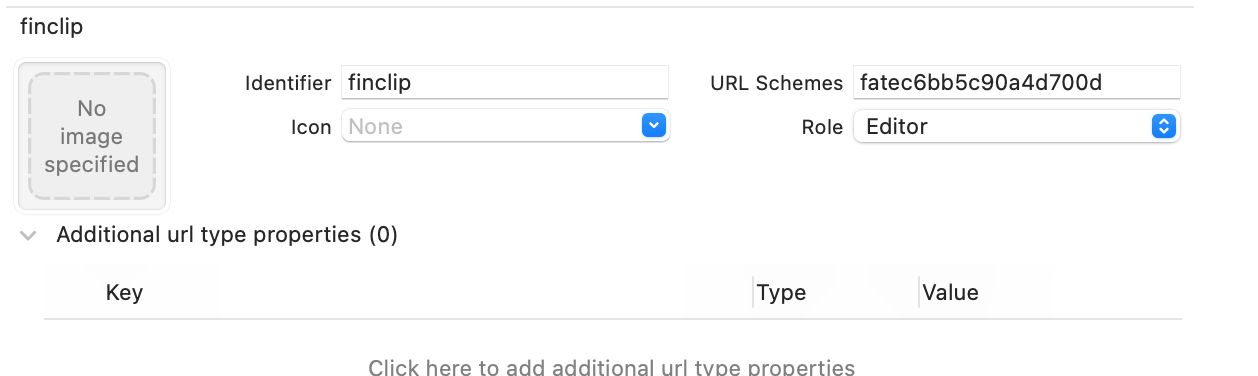
For more information on how to use it, please refer to Open applet using routed form.
5. Adding SDK headers
Where the PhizClip applet SDK is required, add the following code.
#import <FinApplet/FinApplet.h>If the extension SDK is also integrated, the following code is added to call the API in the extension SDK.
#import <FinAppletExt/FinAppletExt.h>To use the wrapped Baidu Maps SDK, the following code will also be added.
#import <FinAppletBDMap/FinAppletBDMap.h>If you want to use the wrapped Gaudet Map SDK, you also need to add the following code.
#import <FinAppletGDMap/FinAppletGDMap.h>If you want to use the wrapped WebRTC library, you also need to add the following code.
#import <FinAppletWebRTC/FinAppletWebRTC.h>If the Bluetooth library is required, the following code will also need to be added.
#import <FinAppletBLE/FinAppletBLE.h>If you need to use the encapsulated SoundNet SDK, you also need to add the following code.
#import <FinAppletAgoraRTC/FinAppletAgoraRTC.h>If a wrapped contact SDK is required, the following code will also need to be added.
#import <FinAppletContact/FinAppletContact.h>If a wrapped clipboard SDK is required, the following code should also be added.
#import <FinAppletClipBoard/FinAppletClipBoard.h>If you need to use the wrapped Phiz extension SDK, you also need to add the following code.
#import <FinAppletWXExt/FinAppletWXExt.h>Of course, the most convenient way to do this is to add the above code to the pch file so that it doesn't have to be referenced where it is used.
6. Initialising the SDK
Call the SDK's initialisation methods in the following methods in the project's AppDelegate.
Note
From 2.13.109 onwards, the PhizClip applet SDK supports the configuration of multiple servers, allowing you to open applets on several different servers at the same time, so the initialisation method has been changed, you can write the server configuration information to a plist file and initialise it as shown in the example below.
NSString *plistPath = [[NSBundle mainBundle]
pathForResource:@"servers" ofType:@"plist"];
NSArray *array = [NSArray arrayWithContentsOfFile:plistPath];
NSMutableArray *storeArrayM = [NSMutableArray array];
for (NSDictionary *dict in array) {
 FATStoreConfig *storeConfig = [[FATStoreConfig alloc] init];
 storeConfig.sdkKey = dict[@"sdkKey"];
 storeConfig.sdkSecret = dict[@"sdkSecret"];
 storeConfig.apiServer = dict[@"apiServer"];
 storeConfig.apmServer = dict[@"apmServer"];
 if ([@"SM" isEqualToString:dict[@"cryptType"]]) {
 storeConfig.cryptType = FATApiCryptTypeSM;
 } else {
 storeConfig.cryptType = FATApiCryptTypeMD5;
 }

 [storeArrayM addObject:storeConfig];
}
FATConfig *config = [FATConfig
configWithStoreConfigs:storeArrayM];
[[FATClient sharedClient] initWithConfig:config error:nil];
It can also be initialized as follows.
NSMutableArray *storeArrayM = [NSMutableArray array];
FATStoreConfig *storeConfig = [[FATStoreConfig alloc] init];
storeConfig.sdkKey = @"Your sdkKey information";
storeConfig.sdkSecret = @"Your sdkSecret information";
storeConfig.apiServer = @"ServerDomain";
storeConfig.apmServer = @"Domain for apm statistics events";
[storeArrayM addObject:storeConfig];

FATStoreConfig *storeConfig2 = [[FATStoreConfig alloc] init];
storeConfig2.sdkKey = @"Your sdkKey information";
storeConfig2.sdkSecret = @"Your sdkSecret information";
storeConfig2.apiServer = @"ServerDomain";
storeConfig2.apmServer = @"Domain for apm statistics events";
storeConfig2.cryptType = FATApiCryptTypeSM;
[storeArrayM addObject:storeConfig2];
FATConfig *config = [FATConfig
configWithStoreConfigs:storeArrayM];
[[FATClient sharedClient] initWithConfig:config error:nil];
When you need to use Baidu Map/Gaode Map to implement the functions of the MAP component, you need to go to the corresponding platform to apply for a KEY and initialise it.
// Preparing the map sdk for initialisation
[FATBDMapComponent setBDMapAppKey:@"requested key"]
[FATGDMapComponent setGDMapAppKey:@"requested key"]
When the functionality of a WebRTC component is required, initial registration of the component is required.
// WebRTC initialisation
[FATWebRTCComponent registerComponent]
When the functionality of the AgoraRTC component is required, an initial registration of the component is required.
// AgoraRTC initialisation
[FATAgoraRTCComponent registerComponent]
When you need to use the functionality of the addPhoneContact API, you need to initialise the registration component.
// ContactSDK initialisation
[FATContactComponent registerComponent]
When the functionality of the getClipboardData, setClipboardData API is required, initial registration of the component is required.
// ClipBoard initialisation
[FATClipBoardComponent registerComponent];
When the ability to use Phiz's payment, login and get user information is required, the registration component needs to be initialised.
// Phiz Extension SDL Initialization
[FATWXExtComponent registerComponent:@"Phizappid"
universalLink:@"universalLink"];
and add the following code to AppDelegate.m.
- (BOOL)application:(UIApplication *)app openURL:(NSURL *)url
options:(NSDictionary<UIApplicationOpenURLOptionsKey,id>
*)options {
 /* Phiz login and share */
 if ([WXApi handleOpenURL:url delegate:[FATWXApiManager
sharedManager]]) {
 return YES;
 }
 return YES;
}
// Before iOS 9.0
- (BOOL)application:(UIApplication *)application openURL:(NSURL
*)url sourceApplication:(NSString *)sourceApplication annotation:(id)
annotation{
 /* Phiz login and share */
 // `WeChatHandleURLDelegate ` for `WXApiDelegate` proxy file
 if ([WXApi handleOpenURL:url delegate:[FATWXApiManager
sharedManager]]) {
 return YES;
 }
 return YES;
}
- (BOOL)application:(UIApplication *)application handleOpenURL:
(NSURL *)url{
 /* Phiz login and share */
 if ([WXApi handleOpenURL:url delegate:[FATWXApiManager
sharedManager]]) {
 return YES;
 }
 return YES;
}
- (BOOL)application:(UIApplication *)application
continueUserActivity:(NSUserActivity *)userActivity
restorationHandler:(void (^)
( NSArray<id<UIUserActivityRestoring>> *
_Nullable))restorationHandler {
 return [WXApi handleOpenUniversalLink:userActivity delegate:
[FATWXApiManager sharedManager]];
}
Note
To use the Phiz Extension SDK you must ensure that the core SDK version is 2.37.13 or above.
Note
As FinAppletWXExt needs to override the open-type related methods in the buttonOpenTypeDelegate (FATAppletDelegate in versions prior to 2.37.13), specifically the methods chooseAvatar, contact, feedback, getPhoneNumber, launchApp and shareAppMessage. getPhoneNumber, launchApp and shareAppMessage. So if you have implemented buttonOpenTypeDelegate and implemented the above six methods, FinAppletWXExt will take over getPhoneNumber, the remaining five methods please migrate as follows, if you have not implemented buttonOpenTypeDelegate or do not use the above six methods, you can If you do not implement buttonOpenTypeDelegate or do not use the above six methods, you can ignore this, if you need to integrate FinAppletWXExt and implement open-type related methods, then please refer to the following instructions.
- After the core SDK and Phiz extension SDK have been successfully initialised, set up your proxy method implementation class
[FATDelegateClientHelper sharedHelper].buttonOpenTypeDelegate
= [FINWXButtonDelegate sharedHelper];- Implement the proxy method of buttonOpenTypeDelegate
- (BOOL)forwardAppletWithInfo:(NSDictionary *)contentInfo
completion:(void (^)(FATExtensionCode code, NSDictionary
*result))completion {
 return YES;
}
- (BOOL)getUserInfoWithAppletInfo:(FATAppletInfo *)appletInfo
bindGetUserInfo:(void (^)(NSDictionary *result))bindGetUserInfo {
 return YES;
}
- (BOOL)contactWithAppletInfo:(FATAppletInfo *)appletInfo
sessionFrom:(NSString *)sessionFrom sendMessageTitle:(NSString *)
sendMessageTitle sendMessagePath:(NSString *)sendMessagePath
sendMessageImg:(NSString *)sendMessageImg showMessageCard:
(BOOL) showMessageCard {
 return YES;
}
- (BOOL)getPhoneNumberWithAppletInfo:(FATAppletInfo *)appletInfo
bindGetPhoneNumber:(void (^)(NSDictionary
*result))bindGetPhoneNumber {
 NSLog(@"AppletInfo:%@", appletInfo);
 return YES;
}
- (BOOL)launchAppWithAppletInfo:(FATAppletInfo *)appletInfo
appParameter:(NSString *)appParameter bindError:(void (^)
(NSDictionary * result))bindError bindLaunchApp:(void (^)
(NSDictionary *result))bindLaunchApp {
 return YES;
}
- (BOOL)feedbackWithAppletInfo:(FATAppletInfo *)appletInfo {
 return YES;
}
- (BOOL)chooseAvatarWithAppletInfo:(FATAppletInfo *)appletInfo
bindChooseAvatar:(void (^)(NSDictionary *result))bindChooseAvatar
{
 return YES;
}
The Bluetooth library does not need to be initialised, it is simply referenced in the project with a header file.
Note
With 2.21.1 and later, it is no longer necessary to call the configuration extension SDK, the SDK will automatically determine internally whether the extension SDK is integrated and automatically trigger the configuration extension SDK.
Of course, if you need to use the API in the extension SDK, you will also need to configure the extension API after initialising the SDK. Simply call the following code once.
// Preparing the extension api
[[FATExtClient sharedClient] fat_prepareExtensionApis];
Note
If currentUserId is not set, the cached data will be cached to the default directory, and when you get the list of recently opened applets, you will get the applets in the default directory. If you want different users to use different cache directories, please set different currentUserIds for different users.
7. handleOpenURL handling
The applet supports external opening of the applet via a link, which needs to be done as follows.
- (BOOL)application:(UIApplication *)application openURL:(NSURL
*)url sourceApplication:(NSString *)sourceApplication annotation:(id)
annotation
{
 if ([[FATClient sharedClient] handleOpenURL:url]) {
 return YES;
 }
 return YES;
}
- (BOOL)application:(UIApplication *)app openURL:(NSURL *)url
options:(NSDictionary<UIApplicationOpenURLOptionsKey,id>
*)options
{
 if ([[FATClient sharedClient] handleOpenURL:url]) {
 return YES;
 }
 return YES;
}
8. Open the applet
FATAppletRequest *request = [[FATAppletRequest alloc] init];
request.appletId = @"applet id";
request.apiServer = @"server address";
request.transitionStyle = FATTranstionStyleUp;
request.startParams = startParams;

[[FATClient sharedClient] startAppletWithRequest:request
InParentViewController:self completion:^(BOOL result, FATError
*error) {
 NSLog(@"Open applet: %@", error);
} closeCompletion:^{
 NSLog(@"Close applet");
}];
For other API descriptions of the PhizClip applet SDK, please see the API documentation.
9. Extended SDK
Quick integration instructions for using the extended SDK, see [Integration SDK] above for details on how to use it (#_2-integration sdk)
9.1 Phiz Extension SDK
Quick access to the Phiz SDK provides the ability to call up Phiz to get login, user information, mobile phone number and payment via the Phiz applet. Shortcut integration method.
pod 'FinAppletWXExt'Note
When using FinAppletWXExt, you need to follow the WeChat Access Guide - iOS Access Guide for configuration, as follows.
- configure the application's
Universal Links. - turn on the
Associated Domainsswitch and add theUniversal Linksdomain name to the configuration. - in the project's Target -> [Info] -> [URL Types], add a new
URL Schemes(key for weixin, value for wx+Appid applied in Weixin). - Add the application access whitelist
LSApplicationQueriesSchemesto the projectinfo.plist, corresponding to the valuesPhiz,weixinandweixinULAPIto be filled in. Remember to checkAssociated Domainsin the Apple Developer CenterApp ID Configuration.
To initialise the registration component.
// Phiz Extension SDL Initialization
[FATWXExtComponent registerComponent:@"Phizappid"
universalLink:@"universalLink"];
and add the following code to AppDelegate.m.
- (BOOL)application:(UIApplication *)app openURL:(NSURL *)url
options:(NSDictionary<UIApplicationOpenURLOptionsKey,id>
*)options {
 /* Phiz login and share */
 if ([WXApi handleOpenURL:url delegate:[FATWXApiManager
sharedManager]]) {
 return YES;
 }
 return YES;
}
// Before iOS 9.0
- (BOOL)application:(UIApplication *)application openURL:(NSURL
*)url sourceApplication:(NSString *)sourceApplication annotation:(id)
annotation{
 /* Phiz login and share */
 // `WeChatHandleURLDelegate ` for `WXApiDelegate` proxy file
 if ([WXApi handleOpenURL:url delegate:[FATWXApiManager
sharedManager]]) {
 return YES;
 }
 return YES;
}
- (BOOL)application:(UIApplication *)application handleOpenURL:
(NSURL *)url{
 /* Phiz login and share */
 if ([WXApi handleOpenURL:url delegate:[FATWXApiManager
sharedManager]]) {
 return YES;
 }
 return YES;
}
- (BOOL)application:(UIApplication *)application
continueUserActivity:(NSUserActivity *)userActivity
restorationHandler:(void (^)
( NSArray<id<UIUserActivityRestoring>> *
_Nullable))restorationHandler {
 return [WXApi handleOpenUniversalLink:userActivity delegate:
[FATWXApiManager sharedManager]];
}
Note
To use the Phiz Extension SDK you must ensure that the core SDK version is 2.37.13 or above.
Note
As FinAppletWXExt needs to override the open-type related methods in the buttonOpenTypeDelegate (FATAppletDelegate in versions prior to 2.37.13), specifically the methods chooseAvatar, contact, feedback, getPhoneNumber, launchApp and shareAppMessage. getPhoneNumber, launchApp and shareAppMessage. So if you have implemented buttonOpenTypeDelegate and implemented the above six methods, FinAppletWXExt will take over getPhoneNumber, the remaining five methods please migrate as follows, if you have not implemented buttonOpenTypeDelegate or do not use the above six methods, you can If you do not implement buttonOpenTypeDelegate or do not use the above six methods, you can ignore this, if you need to integrate FinAppletWXExt and implement open-type related methods, then please refer to the following instructions.
- After the core SDK and Phiz extension SDK have been successfully initialised, set up your proxy method implementation class
[FATDelegateClientHelper sharedHelper].buttonOpenTypeDelegate
= [FINWXButtonDelegate sharedHelper];- Implement the proxy method of buttonOpenTypeDelegate
- (BOOL)forwardAppletWithInfo:(NSDictionary *)contentInfo
completion:(void (^)(FATExtensionCode code, NSDictionary
*result))completion {
 return YES;
}
- (BOOL)getUserInfoWithAppletInfo:(FATAppletInfo *)appletInfo
bindGetUserInfo:(void (^)(NSDictionary *result))bindGetUserInfo {
 return YES;
}
- (BOOL)contactWithAppletInfo:(FATAppletInfo *)appletInfo
sessionFrom:(NSString *)sessionFrom sendMessageTitle:(NSString *)
sendMessageTitle sendMessagePath:(NSString *)sendMessagePath
sendMessageImg:(NSString *)sendMessageImg showMessageCard:
(BOOL) showMessageCard {
 return YES;
}
- (BOOL)getPhoneNumberWithAppletInfo:(FATAppletInfo *)appletInfo
bindGetPhoneNumber:(void (^)(NSDictionary
*result))bindGetPhoneNumber {
 NSLog(@"AppletInfo:%@", appletInfo);
 return YES;
}
- (BOOL)launchAppWithAppletInfo:(FATAppletInfo *)appletInfo
appParameter:(NSString *)appParameter bindError:(void (^)
(NSDictionary * result))bindError bindLaunchApp:(void (^)
(NSDictionary *result))bindLaunchApp {
 return YES;
}
- (BOOL)feedbackWithAppletInfo:(FATAppletInfo *)appletInfo {
 return YES;
}
- (BOOL)chooseAvatarWithAppletInfo:(FATAppletInfo *)appletInfo
bindChooseAvatar:(void (^)(NSDictionary *result))bindChooseAvatar
{
 return YES;
}
9.2 Map extension SDK
When you are using the functionality of the Map component, you can refer to FinAppletBDMap (Baidu Map) or FinAppletGDMap (Gaode Map) if you want to use a three-way map to implement it, or by default by FinAppletExt (native map). Shortcut integration method.
#pod 'FinAppletBDMap'
#pod 'FinAppletGDMap' // Just select a release
pod 'FinAppletExt'
To initialise the registration component. When you need to use Baidu Map/Gaode Map to implement the functions of the MAP component, you need to go to the corresponding platform to apply for a KEY and initialise it.
#import <FinAppletExt/FinAppletExt.h>
// Introduce the corresponding header files as you see fit
#import <FinAppletBDMap/FinAppletBDMap.h>
#import <FinAppletGDMap/FinAppletGDMap.h>// Preparing the map sdk for initialisation
// Initialize the map accordingly to your situation
[FATBDMapComponent setBDMapAppKey:@"requested key"]
[FATGDMapComponent setGDMapAppKey:@"requested key"]9.3 Bluetooth Extension SDK
If you need to use Bluetooth functionality in your applet, you can introduce the Bluetooth extension SDK Shortcut integration method.
pod 'FinAppletBLE'The Bluetooth SDK does not need to be initialised, just introduce the header file
#import <FinAppletBLE/FinAppletBLE.h>9.4 SoundNet Extension SDK
If you need to use live-pusher and live-player functions in your applet, you can introduce the SoundNet SDK Shortcut integration method.
pod 'FinAppletAgoraRTC'To initialise the registration component.
#import <FinAppletAgoraRTC/FinAppletAgoraRTC.h>// AgoraRTC initialisation
[FATAgoraRTCComponent registerComponent]9.5 WebRTC Extension SDK
If you need to use WebRTC functionality in your applet, you can introduce the WebRTCSDK Shortcut integration method.
pod 'FinAppletWebRTC'To initialise the registration component.
#import <FinAppletWebRTC/FinAppletWebRTC.h>// WebRTC initialisation
[FATWebRTCComponent registerComponent]9.6 Contact extension SDK
If you need to use addPhoneContact in the applet to add contacts to your phone's address book, you can bring in the Contacts SDK Shortcut integration method.
pod 'FinAppletContact'To initialise the registration component.
#import <FinAppletContact/FinAppletContact.h>// ContactSDK initialisation
[FATContactComponent registerComponent]9.7 Clipboard Extension SDK
If you need to use the clipboard function in your applet, you can introduce the clipboard SDK Shortcut integration method.
pod 'FinAppletClipBoard'To initialise the registration component.
#import <FinAppletClipBoard/FinAppletClipBoard.h>// ClipBoard initialisation
[FATClipBoardComponent registerComponent];