Applet Management
Applet management mainly introduces the API for operating applets, including: open applet, close applet, search applet, etc.
1. Open the applet
Different scenarios use different api's to open applets. Therefore, we provide several different api for opening applets.
- open the online applet, here generally only need the applet id and server address can be, the api can only open the official version and audit version of the applet.
- open the applet by QR code, this scenario is to scan the QR code on the applet platform, get the content in the QR code, and then use the content to open the applet. The QR code of the applet of the official version, experience version, audit version, development version and preview version can be opened with this Api.
- URL Scheme open applet, this scenario is to embed URL Scheme URI in H5 web page, which triggers to open applet in App, only supports to open official version of applet on the shelf.
1.1 Normal open applet
When opening the applet, it will first determine whether there is a cached applet locally, if not, it will automatically download the applet from the remote server and then open it; if there is a cached applet, it will first open the local applet and then check whether there is a new version on the server side.
If there is a new version, the new version of the applet will be downloaded and the next time it is opened, the new version of the applet will be used; if there is no new version, nothing will be done.
/// Launch the applet
/// @param request Start of the request
/// @param parentVC Parent Page
/// @param completion Complete the callback
/// @param closeCompletion Callbacks when closing applets
- (void)startAppletWithRequest:(FATAppletRequest *)request
        InParentViewController:(UIViewController *)parentVC
                    completion:(void (^)(BOOL result, FATError *error))completion
               closeCompletion:(dispatch_block_t)closeCompletion;
FATAppletRequest
| Attribute | type | Description |
|---|---|---|
| appletId | NSString | Applet id, required |
| apiServer | NSString | The server to which the applet belongs, required |
| appName | NSString | Applet name, not required |
| appletLogo | NSString | Network address of the applet icon, not required |
| startParams | NSDictionary | Applet start parameter, supported key, please refer to FATStartParamKey, not required |
| transitionStyle | FATTranstionStyle | The transition animation method when opening the applet, not required, the default value is FATTranstionStyleUp |
| animated | BOOL | Whether to use animation, not required, the default value is YES |
| sequence | NSNumber | Applet index, not required |
| offlineMiniprogramZipPath | NSString | Offline applet zip path, you can pass in a local applet package path to speed up the first start, not required |
| offlineFrameworkZipPath | NSString | Offline base library zip path, you can pass in a base library path to speed up the first start, not required |
Note: Both offlineMiniprogramZipPath and offlineFrameworkZipPath must be passed if you want to start offline for the first time.
Example code:
FATAppletRequest *request = [[FATAppletRequest alloc] init];
request.appletId = @"Applet id"; // Required fields
request.apiServer = @"Server Address"; // Required fields
request.transitionStyle = FATTranstionStyleUp;
request.startParams = startParams; // Launch parameters of the applet

[[FATClient sharedClient] startAppletWithRequest:request InParentViewController:self completion:^(BOOL result, FATError *error) {
    NSLog(@"Open the applet:%@", error);
} closeCompletion:^{
    NSLog(@"Small program release process");
}];
1.2 QR code to open the small program
In this case, the process is generally more complicated, you need to scan the QR code on the PhizClip applet open platform, get the content of the QR code, and then use the QR code content to call the interface to open the applet.
/// QR code information to start the applet
/// @param request Request object
/// @param parentVC Parent page
/// @param requestBlock A callback to verify the request completion of the QR code
/// @param completion Completed callbacks
/// @param closeCompletion A callback when closing an applet
- (void)startAppletWithQrCodeRequest:(FATAppletQrCodeRequest *)request
              inParentViewController:(UIViewController *)parentVC
                        requestBlock:(void (^)(BOOL result, FATError *error))requestBlock
                          completion:(void (^)(BOOL result, FATError *error))completion
                     closeCompletion:(dispatch_block_t)closeCompletion;
FATAppletQrCodeRequest
| Attribute | type | Description |
|---|---|---|
| qrCode | NSString | QR code content, required |
| transitionStyle | FATTranstionStyle | The transition animation method when opening the applet, not required, the default value is FATTranstionStyleUp |
| animated | BOOL | Whether to use animation, not required, the default value is YES |
Example code:
FATAppletQrCodeRequest *qrcodeRequest = [[FATAppletQrCodeRequest alloc] init];
qrcodeRequest.qrCode = qrCode;

[[FATClient sharedClient] startAppletWithQrCodeRequest:qrcodeRequest inParentViewController:self requestBlock:^(BOOL result, FATError *error) {
    NSLog(@"The request is complete:%@", error);
} completion:^(BOOL result, FATError *error) {
    NSLog(@"Open Finish:%@", error);
} closeCompletion:^{
    NSLog(@"close");
}];
1.3 Open applets using URL Scheme
Sometimes we want to be able to open our applets from a safari-loaded web page or from a third-party app, so we can use URL Scheme to open the applets from our own app.
First, you need to add a URL Type, select Target -> [Info] -> [URL Types] and add a URL Schemes. The format of URL Schemes is md5 of fat+sdkKey, see the following example The format of URL Schemes is the md5 of fat+sdkKey, see the following example The format of URL Schemes is the md5 of fat+sdkKey, see the following example
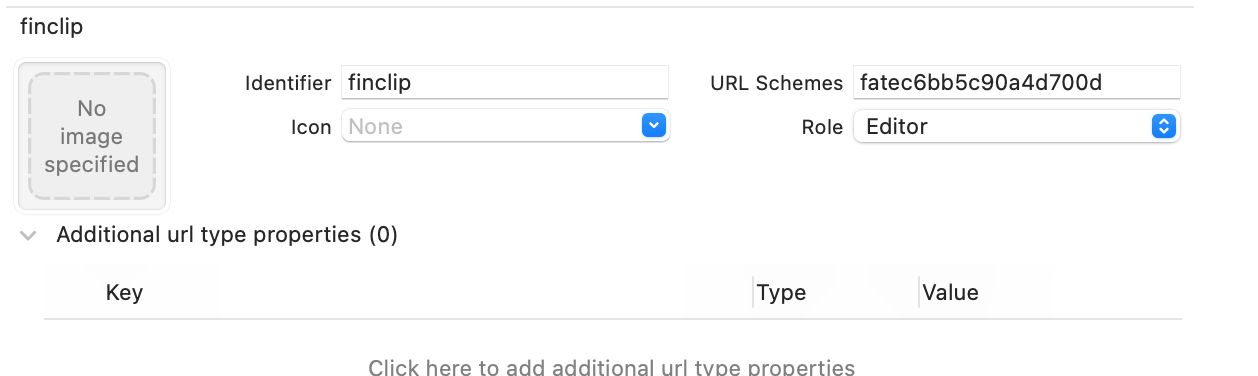
Then, implement the OpenURL proxy method in AppDelagate. The sample code is as follows.
- (BOOL)application:(UIApplication *)application openURL:(NSURL *)url sourceApplication:(NSString *)sourceApplication annotation:(id)annotation
{
    if ([[FATClient sharedClient] handleOpenURL:url]) {
        return YES;
    }
    return YES;
}

- (BOOL)application:(UIApplication *)app openURL:(NSURL *)url options:(NSDictionary<UIApplicationOpenURLOptionsKey,id> *)options
{
    if ([[FATClient sharedClient] handleOpenURL:url]) {
        return YES;
    }
    return YES;
}
Finally, just add the Scheme link in the H5 page. The format of the link: fat{md5 of sdkKey}://applet/appid/{applet id}. The example is as follows.
<a href='fat705b46f78820c7a8://applet/appid/5e017a61c21ecf0001343e31'>Open phizclip</a>Of course, you can also type the full url (e.g. fat705b46f78820c7a8://applet/appid/5e017a61c21ecf0001343e31) into the address bar of your safari browser, then enter and your App will open and launch the applet.
2. Close the applet
Closing the applet is equivalent to Clicking the applet in the capsule in the upper right corner, at this time the applet is retired to the background and the applet is not destroyed.
2.1 Close the specified applet
/**
Close the opened specified applet
@param animated Whether to show animation
@param completion Callback for closing completion
*/
- (void)closeApplet:(NSString *)appletId animated:(BOOL)animated completion:(dispatch_block_t)completion;
2.2 Close all applets
In some scenarios, applet A may open applet B, and applet B opens applet C. If you want to close all the open applets, you can use this method.
/**
Close all currently open applets
@param completion Callback for closing completion
*/
- (void)closeAllAppletsWithCompletion:(dispatch_block_t)completion;
2.3 Close the current applet
/**
Close the current applet
@param animated Whether to show animation
@param completion Callback for closing completion
*/
- (void)closeCurrentApplet:(BOOL)animated completion:(dispatch_block_t)completion;
3. End the applet
When an applet is closed, it doesn't really end, but hangs in the background. When the applet is opened next time, it will immediately switch the applet to run in the foreground. So, if we want the applet to be closed and really ended, we can use the following API to end the specified applet or all applets, depending on the actual situation.
3.1 End the specified applet
After the applet is closed, call the api to delete the cache and destroy the applet.
/**
Delete the specified applet from memory
*/
- (void)clearMemeryApplet:(NSString *)appletId;
3.2 End all applets
This api can be used when you have opened and closed multiple applets and want to end all the applets hanging in the background at once.
/**
 Clear all applets from memory cache
 */
- (void)clearMemoryCache;
4. Delete applet
As the applet is running, it will cache the applet package and applet information locally, and the cache will be used first when it is opened later, so it will be fast when it is opened. So, if you want to delete all the information of an applet, you can use the following api to delete an applet or delete all the applets.
4.1 Delete the specified applet
/**
 Delete specified applet from local storage

 @param appletId Applet id
 @return BOOL Results
 */
- (BOOL)removeAppletFromLocalCache:(NSString *)appletId;
4.2 Delete all applets
///  Delete local cache of applets
- (void)clearLocalApplets;