iOS Frequently Asked Questions
1. Frequently asked questions when integrating
1.1 What is the minimum configuration for the integration SDK?
A: PhizClip applet SDK supports iOS 9 and above, system versions below iOS 9 are not supported.
1.2 Is bitcode supported?
A: Versions before 2.34.5 are not supported, but after 2.34.5 (including 2.34.5) are supported.
1.3 What should I do if the project reports an error and cannot find a category method?
A: This is because there is no configuration -ObjC, there is Catogery created in SDK, you need to add -ObjC in Other Linker Flags in Build Setting.
1.4 What are the parameters that must be configured when initializing the SDK?
A: When the SDK version is lower than 2.34.1, appSecret, appKey, apiServer, apiPrefix are mandatory; when the SDK version is higher than 2.34.1 (including 2.34.1), we have done some optimization to remove apiPrefix, so appSecret, appKey, apiServer are mandatory. appKey,apiServer` are mandatory.
FATStoreConfig *storeConfig = [[FATStoreConfig alloc] init];
storeConfig.sdkKey = @" The SDK Key that is filled in here ";
sdkSecret = @" Fill in SDK secret here ";
storeConfig.apiServer = @" Fill in your server address here "; // example :https://api.PhizClip.com;
storeConfig.apiPrefix = @"/api/v1/mop";  // apiPrefix is not required above
FATConfig *config = [FATConfig configWithStoreConfigs:@[storeConfig]];

[[FATClient sharedClient] initWithConfig:config error:nil];
In addition, if currentUserId is configured, the data will be cached in this directory to facilitate loading data under different accounts when switching between multiple accounts.
1.5 Why does the registered custom applet API not work?
A: When registering a custom API, it will determine whether the current applet SDK has been initialized successfully. If it is not initialized successfully, then the registration of custom Api will not be successful.
Therefore, before registering the custom API, make sure the applet has been initialized successfully.
1.6 Does the applet support horizontal and vertical screen switching or forced horizontal screen?
A:Support.
If you want the applet to support horizontal and vertical screen switching, you need to check Portrait, Landscape Left and Landscape Right in [General] -> [Deployment Info] -> Device Orientation] of iOS project first.
Then, configure [pageOrientation] in the window of the applet's app.json, with optional values: auto / portrait / landscape.
Alternatively, [pageOrientation] can be set separately in the corresponding json configuration of the page.
If it is an iPad, you need to set resizable in app.json if you want to allow the device to support landscape and portrait.
1.7 How can I configure the number of applets to be updated by the SDK batch?
A: There is a property appletIntervalUpdateLimit in FATConfig, the value defaults to 3. That is, when the background automatically checks the version of the car, only the three most recently used applets will be detected. When initializing the SDK, you can modify the appletIntervalUpdateLimit to take a value in the range of 0~50.
1.8 How to try the major version of the SDK?
A: There are some features that are afraid of affecting existing modules, so we put them in the major version of the SDK. If you need this part of the functionality, you can integrate majorSDK in advance to try or develop your own applets in advance.
Major versions of the SDK may contain features that have not been fully tested and are not very stable. There are also two ways to experience the major version of the SDK: manual integration and pod integration.
Manual integration is the same as the manual integration process of the official version, which is to download the SDK, put it into the project, modify the project configuration, etc., so I won't go over it here.
The pod integration is here to focus on! Since the major version is not very stable, it cannot be uploaded to cocoapods source, so we upload the major version sdk to our own repository source. The integration steps are as follows.
1. Add Vantel Warehouse Source
source 'https://git.finogeeks.com/cocoapods/FinPods'Note that if the cocoapods source was not added to the previous podfile, you need to add it.
# Just choose one of these two to add according to your actual situation
source 'https://github.com/CocoaPods/Specs.git'
source 'https://cdn.cocoapods.org/'
2.Specify the version of the SDK in the podfile
pod 'FinApplet', '2.37.0-alpha20220416v03'
pod 'FinAppletExt', '2.37.0-alpha20220416v03'
3.pod install Just install the dependencies, or pod update to update them.
2. Frequently asked questions when using
2.1 How to start the applet?
A: Just call the following API.
[[FATClient sharedClient] startRemoteApplet:appId startParams:startParams InParentViewController:viewController completion:^(BOOL result, NSError *error) {
        NSLog(@"result:%d---error:%@", result, error);
}];
2.2 Are there common error codes and troubleshooting when opening small programs?
A: The common tips for opening the applet failure are as follows 8.
- appId or appTitle is nil. This is because the appId was not configured when the applet was started, or the applet name was not configured when the basic information of the applet was edited in the background.
- copyResources failed This is because moving the downloaded
applet packageorbase library packageto the runtime directory failed, mostly because there is a problem with the compiledapplet zippackage orbase library zippackage. This is becauseservice.htmlis missing from the compiledapplet zippackage, which may be caused by a problem with the compiledapplet zippackage. This is because the downloadedapplet zipfailed to move to the cache directory, which rarely happens. - service exception, get applet details failed This is usually a failure to call the interface to get applet details, usually a problem with the backend service, or a problem with the applet configuration. Remember to check whether
apiPrefixis correctly configured asapi/v1/mop. - the collaboration has been terminated. In this case, it is usually because the admin backend has terminated the cooperation with the application (the corresponding bundleId). Please consult the open platform or the backend administrator for details.
- service is not available. In this case, usually the applet is not yet associated with the application, or there is a problem in the background.
- service abnormal, return applet details data abnormal. In this case, it is generally because the background service is wrong, resulting in the returned data format is not legal.
2.3 How to add Phiz sharing function for small programs?
A: There are 2 main scenarios here as follows:
- modify the forwarding function to Phiz sharing.
- Customize the Phiz sharing interface, and then call the custom Phiz sharing interface in the applet.
2.3.1 Change the forwarding function to Phiz sharing
The PhizClip applet SDK passes the forwarding events through a proxy, so all that is needed is to set an object for [FATClient sharedClient].buttonOpenTypeDelegate that implements it.
Then, it will be possible to get the information on the forwarding in the following proxy method.
/** Forward the event
When you click the forward menu in the top right corner of the applet, the shareAppMessage method in the applet will be triggered, and then callback to the native method
@param contentInfo Applet related information, including applet id, applet name, applet icon, applet screenshot (5:4), etc.
{
appAvatar = "applet icon address ";
appDescription = "Description of the applet ";
appId = "applet id";
appInfo =  {};  // Client can define custom fields in appInfo, appInfo content will be passed through
appStartParams =     {
path = "path of applet page when click forward ";
};
appThumbnail = "Path to the applet cover image, possibly network or local, with an aspect ratio of 5:4";
appTitle = "applet name ";
userId = "applet developer id";
}
@param completion callback. If you want to notify the applet of the result of the completion of the forwarding operation, you need to call this block.
*/
- (BOOL)forwardAppletWithInfo:(NSDictionary *)contentInfo completion:(void (^)(FATExtensionCode code, NSDictionary *result))completion;
Where appInfo is a property added to onShareAppMessage by the applet, the content can define various key-value pairs.
Finally, just call the sharing applet interface of the Phiz sharing SDK.
2.3.2 Customize the Phiz sharing interface, then call the custom Phiz sharing interface in the applet。
Since the PhizClip applet SDK supports custom applet APIs, we can start with a custom sharing API, and after initializing the applet SDK, you can register an applet API like this.
    [[FATClient sharedClient] registerExtensionApi:@"shareToPhiz" handle:^(id param, FATExtensionApiCallback callback) {
    // Here we get param, the object passed in from our applet.

// Then call the Phiz share interface and share.

        callback(FATExtensionCodeSuccess, nil);
    }];
Also, create the PhizClipConf.js file in the root of the applet, with the following configuration example:
module.exports = {
  extApi:[
   {// normal interactive API
name: 'shareToPhiz', // Extension api name This api must be implemented Native
params: {// Extend the api parameter format to list only the required attributes
        path: '',
        title: '',
        description: ''
      }
    }
  ]
}
Finally, just call the custom Phiz sharing interface in the applet:
pz.shareToWechat2.4 Why can't I call the request, uploadFile, downloadFile interfaces? I can't see the process of calling the interfaces even if I grab the packet。
A: If the above three interfaces cannot be called, you will generally see the following error message: url not in domain list.
This is because there is no domain name configured for the applet in the background, and the way to configure the domain name is similar to the domain name configuration of Phiz, which is to separately configure the domain name of request/uploadFile/downloadFile.
2.5 Why the web link cannot be loaded in the webView component of the applet?
A: If you are using webView to open a link and it prompts Does not support opening non-business domain name xxxxxxxxx, please reconfigure. That is because the business domain name, which is the domain from which webView loads links, is not configured in the administration platform.
2.6 How to set the way of transition animation when launching the applet?
A: Now there are 2 types of animations to start the applet as follows.
- the present approach.
- push-like animation.
Just set transitionStyle when calling the following startup functions, the enumeration values are: FATTranstionStyleUp, FATTranstionStylePush.
[[FATClient sharedClient] startRemoteApplet:appId startParams:appStartParams InParentViewController:self transitionStyle:FATTranstionStyleUp completion:^(BOOL result, NSError *error) {
    NSLog(@"result:%d---error:%@", result, error);
}];
2.7 How to register custom applet API?
A: Please refer to iOS Register Custom Applet APIDo the corresponding operation
2.8 How to get a screenshot of the current page of the applet?
A: Call the following function to get a screenshot of the current page of the applet (the screenshot is 5:4).
UIImage *coverImage = [[FATClient sharedClient] getCurrentAppletImage];2.9 Does the menu in the More button in the upper right corner of the applet support customization? If so, how do I implement it?
A:Support.
Two proxy methods need to be implemented. First, customize a FATClientHelper class that implements the FATAppletMoreMenuDelegate protocol.
#import <Foundation/Foundation.h>
#import <FinApplet/FinApplet.h>

@interface FATClientHelper : NSObject<FATAppletMoreMenuDelegate>

+ (instancetype)shareInstance;

@end
Then, after successful initialization of the SDK, set the SDK's proxy to the FATClientHelper object.
Example code.
[[FATClient sharedClient] initWithConfig:config error:nil];

[FATClient sharedClient].moreMenuDelegate = [FATClientHelper shareInstance];
Finally, the implementation in FATClientHelper, the following protocol method.
// Return the menu object to inject, which implements FATAppletMenuProtocol
// Menu objects are of two types (Common by default) :
// 1.OnMiniProgram type: need background configuration + small program configuration, take the same menuId set display
// 2.Common type: display if configured
// PS: This is compatible with the old version, if the background version is not upgraded, or the background version is not configured, only the menuId of the adaptation menu object needs to be NSString type

- (NSArray<id<FATAppletMenuProtocol>> *)customMenusInApplet:(FATAppletInfo *)appletInfo atPath:(NSString *)path
{

    FATCustomMenuModel *favModel1 = [[FATCustomMenuModel alloc] init];
    favModel1.menuId = @"WXShareAPPFriends";
    favModel1.menuTitle = @"Phiz friends";
    favModel1.menuIconImage = [UIImage imageNamed:@"minipro_list_wx_chat"];
    favModel1.menuType = FATAppletMenuStyleOnMiniProgram;

    FATCustomMenuModel *favModel2 = [[FATCustomMenuModel alloc] init];
    favModel2.menuId = @"WXShareAPPMoments";
    favModel2.menuTitle = @"Phiz Moments";
    favModel2.menuIconImage = [UIImage imageNamed:@"minipro_list_wx_monents"];
    favModel2.menuType = FATAppletMenuStyleOnMiniProgram;

    FATCustomMenuModel *favModel3 = [[FATCustomMenuModel alloc] init];
    favModel3.menuId = @"Restart";
    favModel3.menuTitle = @"restart";
    favModel3.menuIconImage = [UIImage imageNamed:@"minipro_list_restart"];
    favModel3.menuType = FATAppletMenuStyleCommon;

    return @[favModel1, favModel2, favModel3];
}

// Event when the custom menu is clicked (old version, used when the background is not upgraded or the menu is not configured after upgrading)
- (void)customMenu:(id<FATAppletMenuProtocol>)customMenu inApplet:(FATAppletInfo *)appletInfo didClickAtPath:(NSString *)path
{
    NSLog(@"So I clicked%@",customMenu.menuTitle);
    NSLog(@"path = %@",path);
}

// Event when clicking custom menu (new version, used in background and applet configuration)
- (void)clickCustomItemMenuWithInfo:(NSDictionary *)contentInfo completion:(void (^)(FATExtensionCode, NSDictionary *))completion
{
    /**
   contentInfo contains
{
@"title": @"title",
"description": @"description",
@"imageUrl": @"image path ",
@"path": @"path to the applet page when clicked "",
@"menuId": @" The clicked menu button id ",
@"params": self.params // Raw parameter data, provided by the applet
}
    */
    // Applet callback call, notify applet click event handling
    completion(FATExtensionCodeSuccess, contentInfo);
}
2.10 Does it support completely hiding the navigation bar on a page of the applet? If so, how to achieve it?
A:Support.
Like Phiz, Alipay, Baidu and other applets navigationStyle has default/custom two values, while PhizClip applet SDK adds a hide on top of this, that is, it has default/custom/hide three values.
So in the page where you need to hide the navigation bar, just set navigationStyle to hide.
2.11 How to set custom rules for grayscale publishing?
A: A protocol method in the FATAppletConfigurationDelegate of the applet SDK.
- (NSDictionary *)grayExtensionWithAppletId:(NSString *)appletIdJust implement this protocol method.
The sample code is as follows:
/// Grayscale extension parameter of applet
/// @param appletId applet id
- (NSDictionary *)grayExtensionWithAppletId:(NSString *)appletId
{
    NSDictionary *grayExtension = @{@"key1":@"value1"};
//    if ([appletId isEqualToString:@"5e017a61c21ecf0001343e31"]) {
//        grayExtension = @{@"fckey1":@"fcvalue1"};
//    }
    return grayExtension;
}
Then, when the applet SDK loads the applet, it will call the protocol method to get the applet's grayscale extension parameters and pass them to the backend service to match the relevant rules.
2.12 What should I do if the web page fails to load in the applet?
A: When the applet fails to load a web page, you can turn on the SDK's Log logging switch. Of course, the error message will also be returned in the webView's binderror callback.
For example, if you see an error message like this:
Code=-1022 "The resource could not be loaded because the App Transport Security policy requires the use of a secure connection."The analysis shows that it is because the network address is http protocol, you need to configure App Transport Security Settings -> Allow Arbitrary Loads to YES in info.plist of the app project.
2.13 Does the applet SDK support dark mode adaptation?
A:Support.
When the applet SDK is initialized, there is a property in the FATUIConfig class that just needs to be set uiconfig.autoAdaptDarkMode = YES;. Dark mode adaptation in the applet SDK, including More menu page, About page, Complaints and Feedback page. The navigation bar color of the applet is not affected by dark mode.
2.14 Does the applet SDK support disabling permission requests?
Our APP is a financial type app, the control of permissions, especially sensitive permissions (such as location) is very important, we hope the SDK will not actively apply for permissions, but let the APP apply for permissions at the right time, is that OK?
A:Support.
The config class of the applet SDK has a property disableAuthorize that controls the application of permissions.
If this property is not configured, or if it is configured as NO, then when the applet SDK uses an api that has not been authorized by the user, it will request it from the user; if this property is set to YES (config.disableAuthorize = YES;), then when the applet SDK uses an api that has not been authorized by the user, it will return a failure in the api's failure callback The reason for the failure (e.g. chooseImage:fail no album access) is included in errMsg.
In addition, the config class of the applet SDK has a property appletAutoAuthorize, which can control the applet to apply for permissions to the SDK. If this property is not configured, or configured as NO, then when the user needs to use a certain permission in the applet, a pop-up box will ask the user if he/she is authorized to agree to the permission application, after the user agrees, the applet will apply for permission to the SDK, if the user refuses, the permission will not be applied to the SDK and will return a failure, errMsg contains the reason for the failure (e.g. chooseImage: fail No album access); if this property is set to YES, it means that the permission will be applied to the SDK automatically and no authorization prompt will pop up.
2.15 Do you support replacing the back button icon? How do I replace it?
A:Support.
Just put a png image in the project and name it fin_btn_navi_back, you need to access it through mainBundle.
2.16 Does it support opening safari in applets?
A:Support.
Although there is no api in our SDK to make the applet open the mobile safari and load the specified url, our SDK supports registering custom api, so by injecting custom H5 api, we can achieve this function. There are two scenarios for injecting custom api: registering api for applets and registering api for H5 in applets. The SDK provides separate functions for these two scenarios, and they are handled differently, so we need to talk about them separately.
Open safari in the H5 of the applet First, after initializing the SDK, register a custom api with the following code snippet example.
[[FATClient sharedClient] fat_registerWebApi:@"openInSafari" handle:^(id param, FATExtensionApiCallback callback) {
    NSString *url = param[@"url"];
    [[UIApplication sharedApplication] openURL:[NSURL URLWithString:url]];

    callback(FATExtensionCodeSuccess, nil);
}];
Then, the page that loads the H5 introduces the PhizClip applet jssdk 。
Finally, in the logic in H5, the registered custom api is called:
window.FinChatJSBridge.invoke('openInSafari', {url:'https://www.PhizClip.com'}, (result) => {
    console.log(result)
});
Open safari in the applet
First, register the custom api for the applet, example snippet.
[[FATClient sharedClient] registerExtensionApi:@"openInSafari" handle:^(id param, FATExtensionApiCallback callback) {
    NSString *url = param[@"url"];
    [[UIApplication sharedApplication] openURL:[NSURL URLWithString:@""]];

    callback(FATExtensionCodeSuccess, nil);
}];
Then, in the root of the applet PhizClipConf.js, configure the custom api.
module.exports = {
  extApi:[
    {
      name: 'openInSafari',
      params: {
        url: ''
      }
    }
  ]
}
Finally, the customization can be called in the applet as follows.
pz.openInSafari({
    url:'https://www.baidu.com',
    success: function (res) {
        console.log("startRecord success");
        console.log(res);
    },
    fail: function (res) {
        console.log("startRecord fail");
        console.log(res);
    }
});
2.17 Does the applet support getting the parameters to launch the applet? How to get them?
A:Support. But the applet can only get the query parameter in the startup parameter.
The parameters in the query are converted to json, and the applet can get the options in the lifecycle events onLaunch(options) and onShow(options).
For example, the applet is launched with the following parameters:
    NSDictionary *startParam = @{
        @"query":@"key1=value1&key2=value2",
        @"path":@"pages/showToast/showToast"
    };
    [[FATClient sharedClient] startRemoteApplet:@"afdfddfdfdf" startParams:startParam InParentViewController:self completion:nil];
Then, to get the launch parameters in the lifecycle event of the applet:
onLaunch(options) {
    console.log("App onLaunch =====>" + JSON.stringify(options))
    //options.query.key1
    //options.path
  },

 onShow(options) {
    // Do something when show.
    console.log("App onShow =====>" + JSON.stringify(options))
    //options.query.key1
    //options.path
  },
2.18 Can the SDK set the UserAgent? How do I set it up?
A:Support.
There is an appendingCustomUserAgent configuration item in FATUIConfig. The content you set will be added to the userAgent of the webView corresponding to the applet page.
Example.
FATUIConfig *uiConfig = [[FATUIConfig alloc] init];//[FATClientHelper uiConfig];
uiConfig.progressBarColor = [UIColor redColor];
// Add the userAgent content
uiConfig.appendingCustomUserAgent = @"custom agent";

[[FATClient sharedClient] initWithConfig:config uiConfig:uiConfig error:nil];
2.19 How to implement third-party login in the applet?
1.Integration of PhizClip Applet SDK (PhizClip Applet SDK)
Developers first need to integrate PhizClip applet SDK, please refer to PhizClip applet open platform iOS integration document for the integration guide, the open platform has a detailed iOS integration document, so I won't repeat it here.
2.Customize the applet interface to achieve authorization login, get user information, get login status and other functions
In order for the applet to obtain APP data other than the applet, you need to register the applet custom interface, please refer to PhizClip Applet Open Platform - Custom Applet Interface for the details of the custom interface.The parameters in the following examples are at the discretion of the developer, and this article is only a demonstration.
- Customized authorization login login interface
@property (nonatomic,strong) FATExtensionApiCallback callBack;

[[FATClient sharedClient] registerExtensionApi:@"login" handle:^(id param, FATExtensionApiCallback callback) {
  self.callBack = callback;
  // Do a third party login.
  [self thirdLogin];
}];

- (void)thirdLogin {
// When ToDo gets the result, it calls back the information it wants to send to the applet. It's up to the developer to decide what happens, PhizClip just passes it around, doesn't save it

// For example login WeChat tripartite document at https://developers.weixin.qq.com/doc/oplatform/Mobile_App/WeChat_Login/Development_Guide.html

  self.callBack(FATExtensionCodeSuccess, @{@"code": @"success", @"openid": @"XXXXXXXXXXXXXXXXX"});
}- Customize the getUserProfile interface to get user information
[[FATClient sharedClient]registerExtensionApi:@"getUserProfile" handle:^(id param, FATExtensionApiCallback callback) {
    NSDictionary *userInfo = @{@"nickName": @"zhangshan", @"avatarUrl": @"", @"gender": @1, @"country": @"china", @"province": @"Guangdong province", @"city": @"shenzhen",@"language": @"zh_CN"};
    NSDictionary *resDic = @{@"userInfo": userInfo};
    callback(FATExtensionCodeSuccess, resDic);
}];- Custom checkSession interface for checking user token
[[FATClient sharedClient] registerExtensionApi:@"checkSession" handle:^(id param, FATExtensionApiCallback callback) {
  // For example
  if ([param[@"code"] intValue] == 1) {
      // ToDo something
  }
}];
2.20 Does it support replacing the "applet" text in the SDK with another name?
A:Support.
There is an appletText configuration item in FATUIConfig, and the content you set will replace the original "applet" text.
Example.
FATUIConfig *uiConfig = [[FATUIConfig alloc] init];//[FATClientHelper uiConfig];
// Replace "applet" with "x app"
uiConfig.appletText = @"x application";

[[FATClient sharedClient] initWithConfig:config uiConfig:uiConfig error:nil];
2.21 When data is reported, is the reported data compressed?
A: When data is reported, the SDK does not compress the reported data by default, if you want to enable compression, you can do so by configuring enableApmDataCompression parameter to YES in the SDK initialization.
Example.
FATStoreConfig *storeConfig = [[FATStoreConfig alloc] init];
storeConfig.sdkKey = @" The SDK Key that is filled in here ";
sdkSecret = @" Fill in SDK secret here ";
storeConfig.apiServer = @" Fill in your server address here "; // example :https://api.PhizClip.com;
FATConfig *config = [FATConfig configWithStoreConfigs:@[storeConfig]];
config.enableApmDataCompression = YES;
2.22 Does it support disabling the applet API for accessing regulatory information?
A:Support.
The SDK by default allows applets to call the applet API (getSuperviseInfo) that gets the supervise information, to disable it you can configure disableGetSuperviseInfo parameter to YES by initializing the SDK.
Example.
FATStoreConfig *storeConfig = [[FATStoreConfig alloc] init];
storeConfig.sdkKey = @" The SDK Key that is filled in here ";
sdkSecret = @" Fill in SDK secret here ";
storeConfig.apiServer = @" Fill in your server address here "; // example :https://api.PhizClip.com;
FATConfig *config = [FATConfig configWithStoreConfigs:@[storeConfig]];
config.disableGetSuperviseInfo = YES;
When disabled, the applet will receive a getSuperviseInfo:fail disabled callback when it calls getSuperviseInfo.
2.23 Does it support opening the Experience applet?
A:Support.
The platform supports to configure the experience version and experience members for the applet, and the members with experience permission are able to open the experience version of the applet.
Steps to use the experience version of the applet:
upload the applet in the platform and configure the experience version for the applet, please refer to Applet Development - Debugging for the configuration method
Pass in the user ID when initializing the SDK.
FATStoreConfig *storeConfig = [[FATStoreConfig alloc] init];
storeConfig.sdkKey = @" The SDK Key that is filled in here ";
sdkSecret = @" Fill in SDK secret here ";
storeConfig.apiServer = @" Fill in your server address here "; // example :https://api.PhizClip.com;
FATConfig *config = [FATConfig configWithStoreConfigs:@[storeConfig]];
config.currentUserId = @"userId";
Only when the incoming user ID is in the list of members configured in the applet, can you open the experience version of the applet, otherwise, when you open the applet, you will be prompted with "No experience permission".
- Open the applet by calling the interface provided by the SDK, please refer to QR code to open the applet for the interface
2.24 Can you support offline applets to improve first-time launch speed?
A: Starting from version 2.35.1, you can configure the path to the offline applet package and the offline base library package. Open the local offline applet on first launch. Also check for updates and pull the latest version of the applet for the next time the applet is opened.
The sample code is as follows:
    FATAppletRequest *request = [[FATAppletRequest alloc] init];
// appletId can from the small and medium-sized program list for https://www.PhizClip.com/mop/mechanism/#/Applet/my pages
request.appletId = @"61ee725a8bc99400018e1f7c";
request.apiServer = @"https://api.PhizClip.com";
// Offline applet compressed package can be downloaded from my applet -> Applet list -> Details -> Export offline package -> Applet
request.offlineMiniprogramZipPath = [[NSBundle mainBundle] pathForResource:@"hahahhah" ofType:@"zip"];
// Offline base library can be downloaded from my applet -> Applet List -> Details -> Export offline package -> Applet Base Library
Request. OfflineFrameworkZipPath = [[NSBundle mainBundle] pathForResource: @ "framework - 2.12.3 ofType:" @ "zip"].

[[FATClient sharedClient] startAppletWithRequest:request InParentViewController:self.window.rootViewController  completion:^(BOOL result, FATError *error) {
NSLog(@" Open applet 11:%@", error);
} closeCompletion:^{
NSLog(@" close applet 11");
}];
2.25 Is WebRTC functionality supported on systems below iOS 14.3?
A: Support. The platform implements WebRTC related functions in iOS9 or above by secondary packaging GoogleWebRTC library.
The steps to use are as follows.
- Add a dependency on the WebRTC-SDK to the Xcode project's Podfile file:
pod 'FinAppletWebRTC'- Introduce the WebRTC-SDK headers:
#import <FinAppletWebRTC/FinAppletWebRTC.h>- Registering WebRTC components:
// WebRTC initialization
[FATWebRTCComponent registerComponent]
After completing the above steps, you can call the WebRTC Api provided by us in the applet to implement the relevant functions.
2.26 What MapSDK does and how to use it
A: MapSDK supports Map component and location API. It relies on the expansion SDK as a complement to Map and Location functions. It supports Gode Map|Gode Location, Baidu Map|Baidu Location, two combinations, the default is implemented by the native map, choose to integrate Baidu/Gode, if integrated at the same time, use the last initialized one.
Use the following steps:
- Add a dependency on MapSDK to the Xcode project's Podfile file:
// If you need to use Baidu Maps SDK, add this extension SDK
pod 'FinAppletBDMap'
// If you need to use the AmAP SDK, add this extension SDK
pod 'FinAppletGDMap'- Introduce the MapSDK header file:
// Similarly, if using Baidu maps, import this header
#import <FinAppletBDMap/FinAppletBDMap.h>
// Import this header if using AmAP
#import <FinAppletGDMap/FinAppletGDMap.h>- Register the MapSDK component:
// Prepare map sdk initialization
// Initialize with this api if using Baidu maps
[FATBDMapComponent setBDMapAppKey:@" Application key"]
// Initialize with this api if using AmAP
[FATGDMapComponent setGDMapAppKey:@" application key"]- The map component or map api is called in the applet:
2.27 Why is PhizClip applet SDK a dynamic library? Can I deliver a static library?
A: Since Apple supports third-party creation of dynamic libraries, there are many third-party SDKs that are dynamic libraries. By using dynamic libraries, you can reduce the size of the final executable file. In order to make the App size grow as small as possible, PhizClip Applet SDK has always provided dynamic libraries to the public. PhizClip R&D team has limited resources and efforts, so we can't maintain both static and dynamic libraries for now, so only dynamic libraries are packaged for normal iteration.
If you insist on needing static libraries, we can also handle the static libraries as a special package and deliver them separately. We have also written a demo to test that the applet works fine with the PhizClip static library. However, if there is a conflict or problem with the host app, we cannot guarantee to deal with it in time.
In addition, the static library can only be integrated manually now, and the integration steps are as follows:
1. Add SDK to project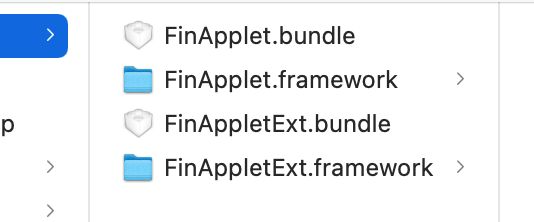
Of course, if you do not need to use the api in FinAppletExt.framework, then you can also not add FinAppletExt.framework and FinAppletExt.bundle.
Node
When introducing FinAppletBDMap (Baidu Map) or FinAppletGDMap (Gaode Map) manually, you need to manually add the bundle resource file in the framework to the project as well (FinAppletBDMap.bundle or FinAppletGDMap.bundle).
2 Modify project configuration
1)Adding dependent system dynamic libraries:
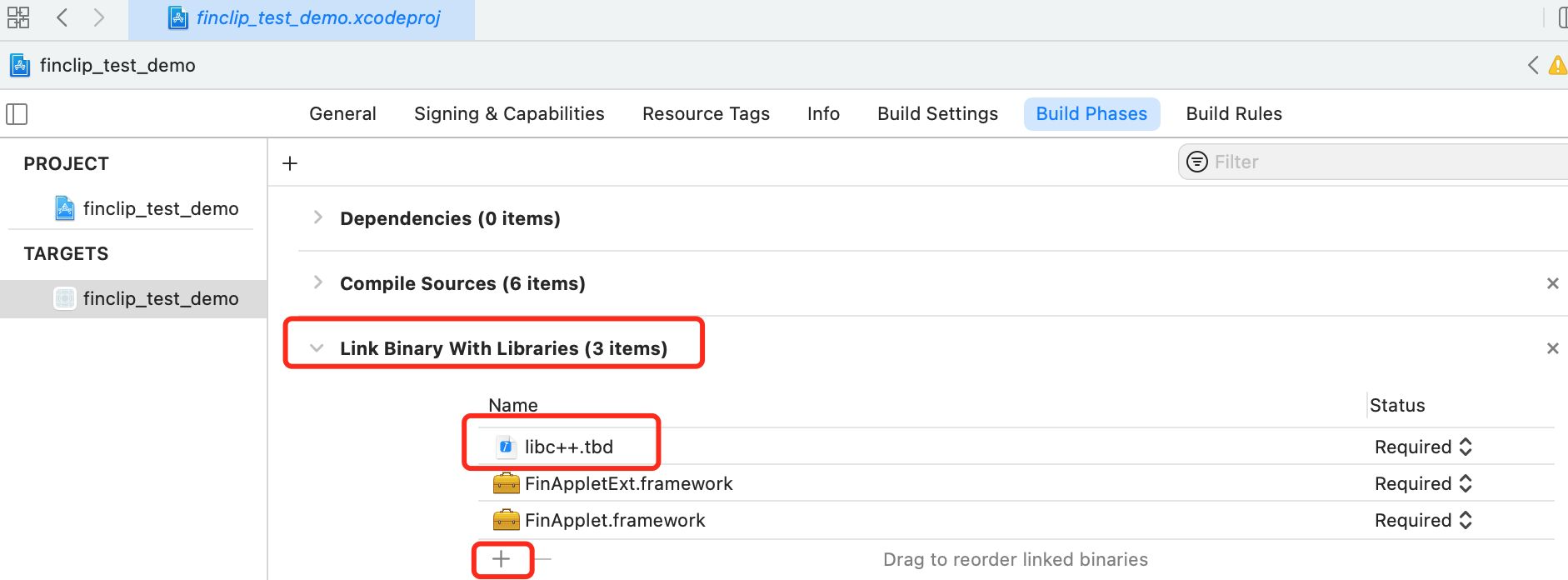
2)Add -ObjC to Build Setting ->Other Linker Flags.
Node
When introducing FinAppletBDMap (Baidu Map) or FinAppletGDMap (Gaode Map) manually, the embedding type defaults to Do Not Embed (TARFGETS --- General --- Frameworks,Libraries,abd Embedded Content). When manually introducing Gaode Maps, you need to access Gaode's AMap3DMap-NO-IDFA, AMapLocation-NO-IDFA, AMapSearch-NO-IDFA libraries, when manually introducing Baidu Maps, you need to access Baidu's BMKLocationKit, BaiduMapKit/Map, BaiduMapKit/Search libraries. BaiduMapKit/Search three libraries.
3 Open Project
Double-click xxxx.xcodeproj to open the project.
4 Configuring the archive script
The SDK includes the x86_64 architecture to make it easier for us to debug with the emulator when developing. However, SDKs with x86_64 architecture will report errors when packaged and uploaded to the app market, so configuring a script that automatically removes the emulator architecture when packaged will allow us to both develop and debug with the emulator and submit to the app market properly.
Of course, you can also ask us for an SDK that does not include an emulator.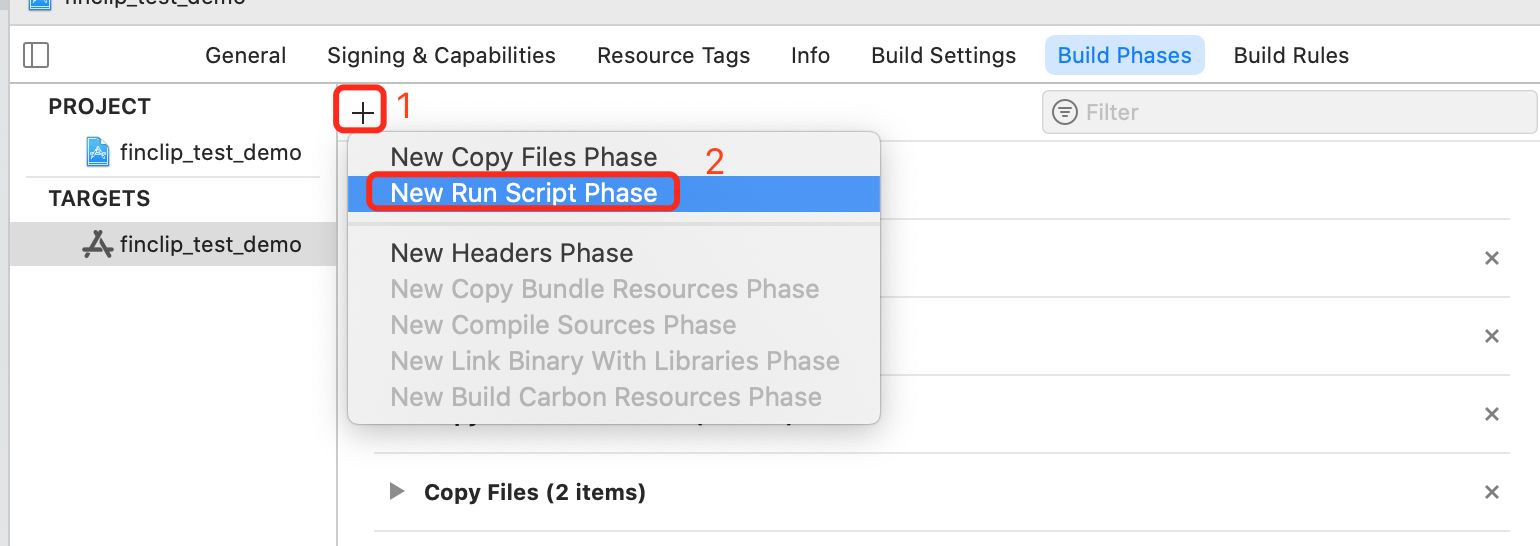
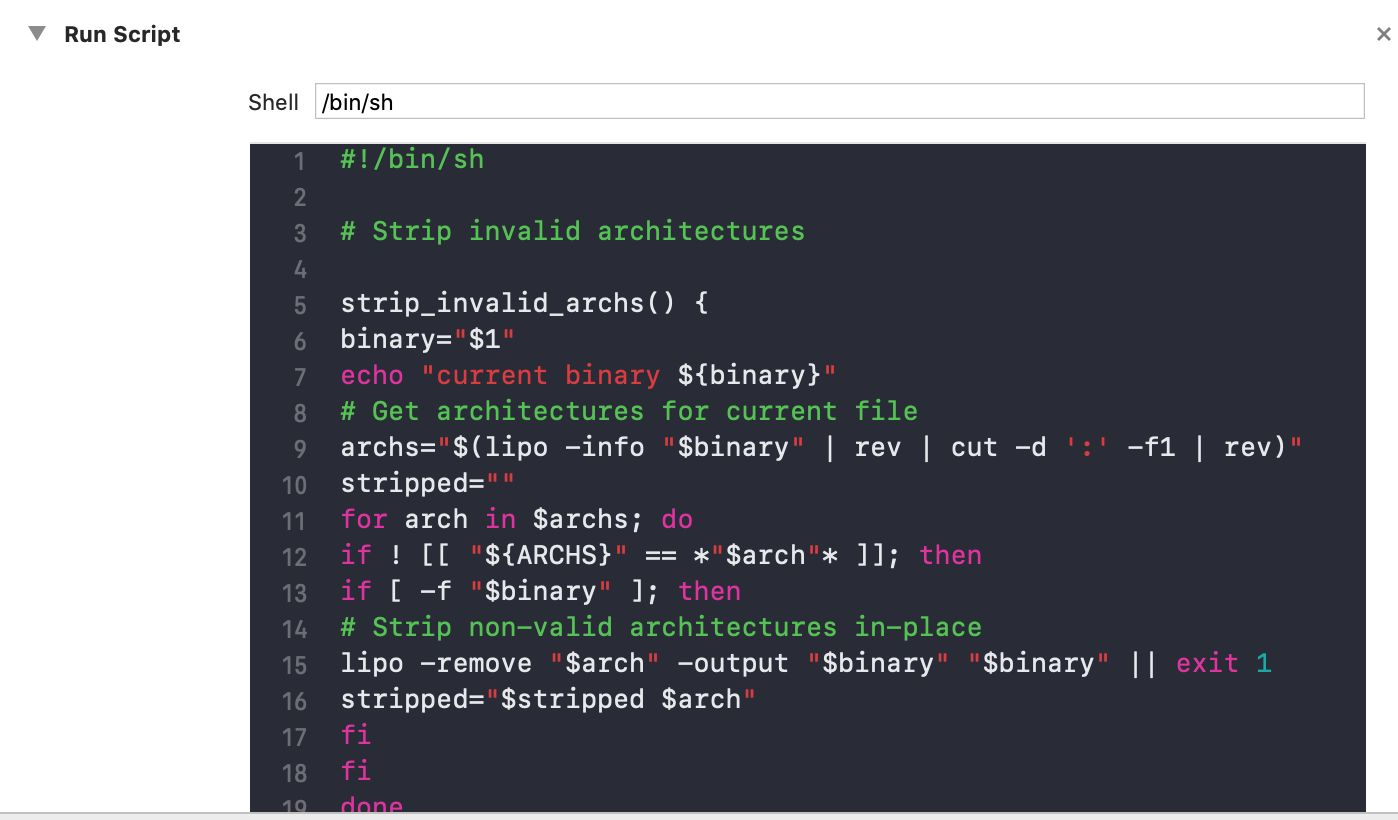
The script reads as follows:
#!/bin/sh

# Strip invalid architectures

strip_invalid_archs() {
binary="$1"
echo "current binary ${binary}"
# Get architectures for current file
archs="$(lipo -info "$binary" | rev | cut -d ':' -f1 | rev)"
stripped=""
for arch in $archs; do
if ! [[ "${ARCHS}" == *"$arch"* ]]; then
if [ -f "$binary" ]; then
# Strip non-valid architectures in-place
lipo -remove "$arch" -output "$binary" "$binary" || exit 1
stripped="$stripped $arch"
fi
fi
done
if [[ "$stripped" ]]; then
echo "Stripped $binary of architectures:$stripped"
fi
}

APP_PATH="${TARGET_BUILD_DIR}/${WRAPPER_NAME}"

# This script loops through the frameworks embedded in the application and
# removes unused architectures.
find "$APP_PATH" -name '*.framework' -type d | while read -r FRAMEWORK
do
FRAMEWORK_EXECUTABLE_NAME=$(defaults read "$FRAMEWORK/Info.plist" CFBundleExecutable)
FRAMEWORK_EXECUTABLE_PATH="$FRAMEWORK/$FRAMEWORK_EXECUTABLE_NAME"
echo "Executable is $FRAMEWORK_EXECUTABLE_PATH"

strip_invalid_archs "$FRAMEWORK_EXECUTABLE_PATH"
done
2.28 Does the applet support custom menus?
A: Support.
The custom menu is popped up by implementing the applet:(FATAppletInfo _)appletInfo didClickMoreBtnAtPath:(NSString _)path proxy method of FATAppletMoreMenuDelegate.
/**
 In the upper right corner capsule [...] You can pop up more views of your design in this event.
Therefore, the proxy event is implemented so that the following two custom menu events are not fired
@param appletInfo appletInfo
Pathapplet page path, example: pages/index/index
 */
- (void)applet:(FATAppletInfo *)appletInfo didClickMoreBtnAtPath:(NSString *)path;
If you have implemented a custom menu, but want to jump to the settings, about and feedback pages of the applet or want to implement the forwarding function, you can use the relevant Api provided by FATMoreMenuHelper to implement it.
/// Trigger the forwarding event, which is used to get the information of the applet used in forwarding. After getting the information of the applet, Triggers - (void)forwardAppletWithInfo:(NSDictionary *)contentInfo completion: void (^)(FATExtensionCode, NSDictionary *))completion of this callback
/// @param appletId applet id
+ (void)invokeForwardMenuAction:(NSString *)appletId;


/// Open the applet feedback page
/// @param appletId applet id
+ (void)goToFeedbackPage:(NSString *)appletId;


/// Open the applet's About page
/// @param appletId applet id
+ (void)goToAboutPage:(NSString *)appletId;


/// Open the applet Settings page
/// @param appletId applet id
+ (void)goToSettingPage:(NSString *)appletId;


/// Turn debug mode on // Turn debug mode on // Turn debug mode off if config has enableAppletDebug set to true
/// @param appletId applet id
/// @param enable Enables debug mode
+ (void)setEnableAppletDebug:(NSString *)appletId enable:(BOOL)enable;


/// Get if the applet is in debug mode
/// @param appletId applet id
+ (BOOL)isEnableAppletDebug:(NSString *)appletId;


/// Get data for custom menu items (need applet to implement menu items, need applet to provide additional call parameters)
/// @param appletId applet id
/// @param menuId Menu id
/// @param complete result callback
+ (void)getMiniProgramTypeMenuData:(NSString *)appletId menuId:(NSString *)menuId complete:(void(^)(NSDictionary  *result,FATAppletInfo *appletInfo))complete;

/// Check whether the applet implements the custom menu function
/// which whether the small program called onShareAppMessage event the influence showShareMenu/hideShareMenu API
/// If the applets call showShareMenu after calling this method detection, no matter whether the applets implement onShareAppMessage event or not, the corresponding value of this event is YES
/// If the applet calls this method after calling hideShareMenu, NO matter whether the applet implements onShareAppMessage event or not, the corresponding value of this event is no
/// @param appletId applet id
/// @param menuIds Custom menu ID array
/// @param complete result callback, callback parameter is NSArray, NSArray element is @{"eventName": ## applet event name ##,"menuId": ## menu id##, "value": ## event implemented #}
+ (void)checkMenus:(NSString *)appletId menuIds:(NSArray<NSString *> *)menuIds complete:(void(^)(NSArray *result))complete;
Custom menu sample code:
// in achieving FATAppletMoreMenuDelegate method to realize the proxy class, in the agent approach can use a custom menu view, finally must return to YES
- (BOOL)appletInfo:(FATAppletInfo *)appletInfo didClickMoreBtnAtPath:(NSString *)path {
    // Here we use UIAlertController as an example (user-definable view)
    UIAlertController *alertVC = [UIAlertController alertControllerWithTitle:@More menus "message:@" Customize more menus" preferredStyle:UIAlertControllerStyleActionSheet];

    UIAlertAction *forwardAction = [UIAlertAction actionWithTitle:  @"transmit"  style:UIAlertActionStyleDefault handler:^(UIAlertAction * _Nonnull action) {
        // When the click event is responded, the [+ (void)invokeForwardMenuAction:] method is called to realize the call of the [forwarding] function
        [FATMoreMenuHelper invokeForwardMenuAction:appletInfo.appId];
    }];
    [alertVC addAction:forwardAction];

    UIAlertAction *feedbackAction = [UIAlertAction actionWithTitle:@"Feedback and Complaints" style:UIAlertActionStyleDefault handler:^(UIAlertAction * _Nonnull action) {
        // Click on the event response, call the [+ (void)goToFeedbackPage:] method to achieve the [feedback and complaint] page jump
        [FATMoreMenuHelper goToFeedbackPage:appletInfo.appId];
    }];
    [alertVC addAction:feedbackAction];

    UIAlertAction *aboutAction = [UIAlertAction actionWithTitle:@"about" style:UIAlertActionStyleDefault handler:^(UIAlertAction * _Nonnull action) {
        // When the response is clicked, the [+ (void)goToAboutPage:] method is called to navigate to the [About] page
        [FATMoreMenuHelper goToAboutPage:appletInfo.appId];
    }];
    [alertVC addAction:aboutAction];

    UIAlertAction *settingAction = [UIAlertAction actionWithTitle:@"Settings" style:UIAlertActionStyleDefault handler:^(UIAlertAction * _Nonnull action) {
        // When the event is clicked, the [+ (void)goToSettingPage:] method is called to navigate to the [Settings] page
        [FATMoreMenuHelper goToSettingPage:appletInfo.appId];
    }];
    [alertVC addAction:settingAction];

    // Gets the status of debug Mode button
    BOOL enableDebug = [FATMoreMenuHelper isEnableAppletDebug:appletInfo.appId];
    UIAlertAction *debugAction = [UIAlertAction actionWithTitle: enableDebug ? @"Turn debug mode on" : @" Turn debug mode on"style:UIAlertActionStyleDefault handler:^(UIAlertAction * _Nonnull action) {
        // Click event response, called "+ (void) setEnableAppletDebug: enable:" method, realize the state of "debug mode" button to set
        [FATMoreMenuHelper setEnableAppletDebug:appletInfo.appId enable:!enableDebug];
    }];
    [alertVC addAction:debugAction];

    // Custom menu button ids
    NSArray *menuIds = @[ @"WXShareAPPFriends", @"WXShareAPPMoments", @"ShareSinaWeibo", @"ShareQQFriends" ];
    // Call [+ (void) checkMenus: menuIds: complete: 】 method, testing the incoming menuIds whether within the small program implementation
    [FATMoreMenuHelper checkMenus:appletInfo.appId menuIds:menuIds complete:^(NSArray * _Nonnull result) {
        // Iterate over the detection results
        for (NSDictionary *dict in result) {
            NSString *title = dict[@"eventName"];
            NSString *menuId = dict[@"menuId"];
            BOOL value = [dict[@"value"] boolValue];
            UIAlertAction *customAction = [UIAlertAction actionWithTitle:title style:UIAlertActionStyleDefault handler:^(UIAlertAction * _Nonnull action) {
                // Click event response, call [+ (void) getMiniProgramTypeMenuData: menuId: complete: 】 method, trigger small program calls the custom button
                [FATMoreMenuHelper getMiniProgramTypeMenuData:appletInfo.appId menuId:menuId complete:^(NSDictionary * _Nonnull result, FATAppletInfo * _Nonnull appletInfo) {
                    // Customize the menu button click event callback, add the business code here
                }];
            }];
            // Sets the click state of the button
            customAction.enabled = value;
            [alertVC addAction:customAction];
        }

        [alertVC addAction:[UIAlertAction actionWithTitle:@"cancel" style:UIAlertActionStyleCancel handler:nil]];
        // Display a custom menu
        UIViewController *topVC = [[UIApplication sharedApplication] fin_topViewController];
        [topVC presentViewController:alertVC animated:YES completion:nil];
    }];

    // Returns YES
    return YES;
}
3. Debugging
3.1 How to debug the applet?
If you need to debug an applet, there are several ways to enable Debug mode.
- Set
config.enableAppletDebug = YES;in the initialization configuration. It can make all applets show vconsole, please keep this configuration off when the app is online. (When set to YES, the api cannot turn off debug)
- Set
- When
config.enableAppletDebug = NO;in the initialization configuration, each applet can turn on Debug mode independently. Non-online version (such as experience version, audit version, development version, preview version) can open Debug mode by [open debug] in the more menu.
- When
- Enable Debug mode by calling applet api(
pz.setEnableDebug).
- Enable Debug mode by calling applet api(
In Debug mode, the applet will open the vconsole, so you can see the log information of the applet, environment information, etc. in the vconsole.
In addition, after integrating the applet SDK, Xcode can run the applet (the application packaged with develop profile can also be viewed by computer Safari), you can open the computer Safari, then in the toolbar development, select the emulator or real device running, you can select the list of pages opened by the applet, select the current Select the currently open page, you can review the page elements, view the network calls, have some log logs, etc.