Set the loading page UI
1. Effect show
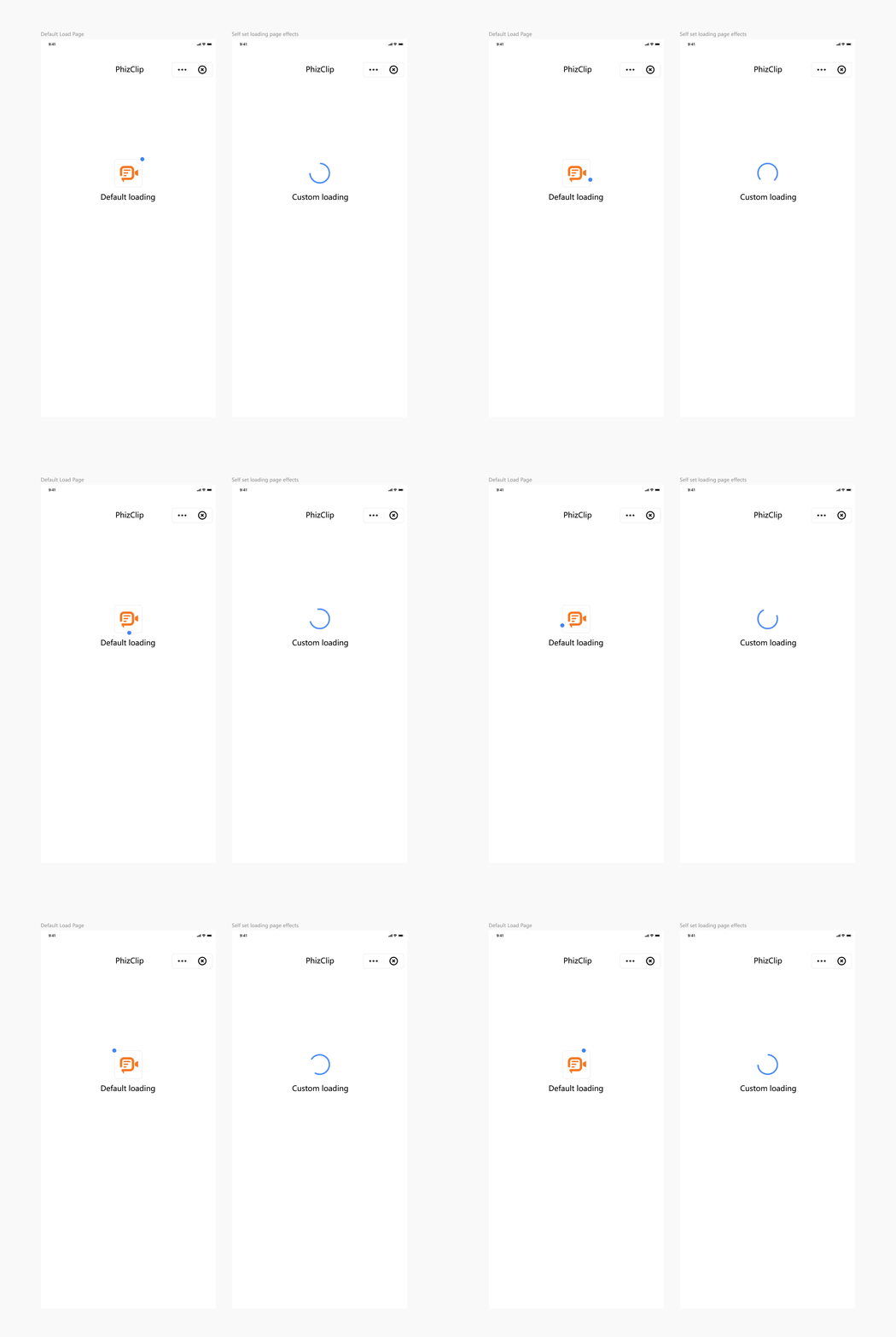
PhizClip applet SDK supports personalized configuration of loading pages and error pages. Among them:
- Loading page means: when launching the applet, if the applet is not downloaded to the device, the applet container will start the loading page to prompt the user to wait, and when the applet is installed to the device, the loading page will close and jump to the applet. When users open the applet for the first time, or after the applet version update, the loading page will stay relatively long
- The error page is the page displayed to the user when the applet fails to load or generates other unknown errors.
The specific UI effect can be seen in the following figure:
2. Coverage
This setting is implemented by the App, you can configure the view of loading page and error page, once set, all the applets in the App will be implemented according to this effect.
3. iOS setup method
3.1 Implementing custom loading pages
For iOS applets, the SDK supports developers to customize the content of the loading page, you can configure it as follows: 1. Modify the style of the loading page in the subclass inherited from FATBaseLoadingView.
Code examples are as follows:
@interface LoadingView : FATBaseLoadingView
@end
@implementation LoadingView
- (instancetype)initWithFrame:(CGRect)frame {
    if ([super initWithFrame:frame]) {
        self.backgroundColor = [UIColor greenColor];
        self.loadingView.padding = 20;
        self.loadingView.dotView.backgroundColor = [UIColor blackColor];
        self.loadingView.animation.duration = 5;
        self.titleLabel.textColor = [UIColor redColor];
    }
    return self;
}
@end
2.Set the baseLoadingViewClass property of the FATConfig object to the class name of the custom loading page.
FATConfig *config = [FATConfig configWithStoreConfigs:storeConfigs];
config.baseLoadingViewClass = @"LoadingView";
[[FATClient sharedClient] initWithConfig:config error:nil];
3.2 Implementing a custom loading failure page
The implementation is similar to the custom loading page, the specific steps are as follows: 1. Modify the style of the loading failure page in the subclass inherited from FATBaseLoadFailedView.
@interface LoadFailedView : FATBaseLoadFailedView
@end
@implementation LoadFailedView
- (instancetype)initWithFrame:(CGRect)frame {
    self = [super initWithFrame:frame];
    if (self) {
        self.errorLabel.textColor = [UIColor redColor];
    }
    return self;
}
- (void)layoutSubviews {
    [super layoutSubviews];
    CGFloat bottom = self.fat_height;
    self.errorImageView.fat_bottom = bottom - 110;
    self.errorLabel.fat_top = self.errorImageView.fat_bottom + 30;
    self.detailLabel.fat_top = self.errorLabel.fat_bottom + 15;
}
@end
2.Set the baseLoadingViewClass property of the FATConfig object to the class name of the custom loading failure page.
FATConfig *config = [FATConfig configWithStoreConfigs:storeConfigs];
config.baseLoadFailedViewClass = @"LoadFailedView";
[[FATClient sharedClient] initWithConfig:config error:nil];
4. Android setup method
The SDK provides an abstract class IFinAppletLoadingPage that developers can inherit from to implement their own loading page view and failure page view and configure the implementation class when initializing the SDK.
4.1 IFinAppletLoadingPage abstract method description
/**
 * Layout ID of the applet in loading
 */
abstract fun getLoadingLayoutRes(): Int

/**
 * Layout ID for applet load failure
 */
abstract fun getFailureLayoutRes(): Int

/**
 * Applet load failure callback
 *
 * @param msg   Error message
 */
@Deprecated("No more callbacks since version 2.36.3, please use onLoadingFailure(title: String, msg: String)")
abstract fun onLoadingFailure(msg: String)

/**
 * Applet load failure callback
 *
 * @param title Wrong title
 * @param msg   Error message
 */
abstract fun onLoadingFailure(title: String, msg: String)

/**
 * Update the information about the applet, the parameters are the basic information of the applet, it will call back several times,
 * May be empty at the initial callback (e.g. the applet is launched for the first time and basic information has not been downloaded),
 * Developers are required to perform their own nulling.
 *
 * @param appTitle      app name
 * @param appAvatarUrl  app icon link
 */
abstract fun onUpdate(appTitle: String, appAvatarUrl: String)
This class provides two layout instances:
failureLayout
The layout of the error page file returned by the getFailureLayoutRes method
loadingLayout
Corresponds to the layout file layout of the loading page returned by the getLoadingLayoutRes method
4.2 Custom loading page complete implementation example
Node
Since the SDK internally uses reflection techniques to instantiate the implementation class, the load page implementation class must contain only Context as a parameter to the constructor.
Examples are as follows:
class CustomLoadingPage constructor(context: Context) : IFinAppletLoadingPage(context) {

    override fun getFailureLayoutRes(): Int {
        // Error page layout resource file
        return R.layout.layout_applet_failure
    }

    override fun getLoadingLayoutRes(): Int {
        // Load page layout resource file
        return R.layout.layout_applet_loading
    }

    override fun onLoadingFailure(msg: String) {
        // This method is deprecated, please use the following onLoadingFailure(title: String, msg: String)
    }

    override fun onLoadingFailure(title: String, msg: String) {
        // Error page error message body
        failureLayout.findViewById<TextView>(R.id.tvLoadingFailedTitle).text = title
        failureLayout.findViewById<TextView>(R.id.tvLoadingFailedMsg).text = msg
    }

    override fun onUpdate(appTitle: String, appAvatarUrl: String) {
        // Loading page applet name
        loadingLayout.findViewById<TextView>(R.id.tvTitle).text = appTitle
        // Loading page applet icon
        ImageLoader.get(context).load(appAvatarUrl, object : DrawableCallback {
            override fun onLoadFailure() {

            }

            override fun onLoadSuccess(r: Drawable) {
                loadingLayout.findViewById<RoundedImageView>(R.id.ivAvatar).setImageDrawable(r)
            }
        })
    }
}
4.3 Configure the loading page during SDK initialization
val uiConfig = FinAppConfig.UIConfig()
// Configuring custom loading pages
uiConfig.setLoadingLayoutCls(CustomLoadingPage::class.java)

val config = FinAppConfig.Builder()
        // Other configuration items omitted
        .setUiConfig(uiConfig)
        .build()

FinAppClient.init(application, config, object : FinCallback<Any?> {
    override fun onSuccess(result: Any?) {

    }

    override fun onError(code: Int, error: String) {

    }

    override fun onProgress(status: Int, error: String) {
    }
})