Configurar cápsulas de applet
1. Efeito mostra
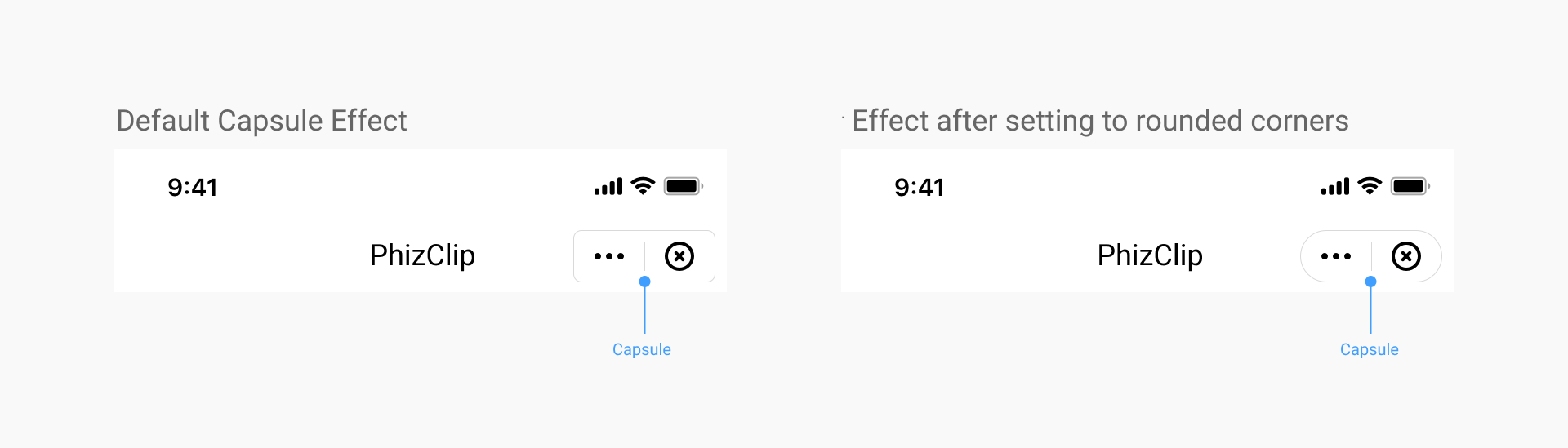
2. Defina o estilo da interface do usuário da cápsula de applet
2.1 Cobertura
Uma vez definido, todos os applets no aplicativo serão implementados com essa eficiência.
2.2 Método de configuração do iOS
Ao inicializar o SDK, a configuração é feita através do CapsuleConfig aula:
//Set the width of the top-right capsule view to 88
[FATClient sharedClient].uiConfig.capsuleConfig.capsuleWidth = 88;
Descrição de itens configuráveis específicos:
/**
 The width of the capsule view in the upper right corner, default value is 88
 */
@property (nonatomic, assign) CGFloat capsuleWidth;

/**
 The height of the top-right capsule view, the default value is 32
 */
@property (nonatomic, assign) CGFloat capsuleHeight;

/**
 The right margin of the top-right capsule view, the default value is 10
 */
@property (nonatomic, assign) CGFloat capsuleRightMargin;

/**
 The radius of the rounded corners of the upper right capsule view, the default value is 5
 */
@property (nonatomic, assign) CGFloat capsuleCornerRadius;

/**
 The border width of the top-right capsule view, default value is 0.8
 */
@property (nonatomic, assign) CGFloat capsuleBorderWidth;

/**
 Light color of the border in the upper right corner of the capsule view
 */
@property (nonatomic, strong) UIColor *capsuleBorderLightColor;

/**
 Dark color of the border of the capsule view in the upper right corner
 */
@property (nonatomic, strong) UIColor *capsuleBorderDarkColor;

/**
 Light color of the background of the upper right capsule view
 */
@property (nonatomic, strong) UIColor *capsuleBgLightColor;

/**
 Dark background color for capsule view in the upper right corner
 */
@property (nonatomic, strong) UIColor *capsuleBgDarkColor;

/**
 Image object for the light-colored more buttons in the capsule, if not passed, the default icon will be used
 */
@property (nonatomic, strong) UIImage *moreLightImage;

/**
 Image object for the darker more buttons in the capsule, if not passed, the default icon will be used
 */
@property (nonatomic, strong) UIImage *moreDarkImage;

/**
 The width of more buttons in the capsule, equal in height and width
 */
@property (nonatomic, assign) CGFloat moreBtnWidth;

/**
 The left distance of the more button in the capsule
 */
@property (nonatomic, assign) CGFloat moreBtnLeftMargin;

/**
 Image object for the light-colored more buttons in the capsule, if not passed, the default icon will be used
 */
@property (nonatomic, strong) UIImage *closeLightImage;

/**
 Image object for the darker more buttons in the capsule, if not passed, the default icon will be used
 */
@property (nonatomic, strong) UIImage *closeDarkImage;

/**
 The width of the close button in the capsule, equal in height and width
 */
@property (nonatomic, assign) CGFloat closeBtnWidth;

/**
 The left distance of the close button in the capsule
 */
@property (nonatomic, assign) CGFloat closeBtnLeftMargin;

/**
 The light color of the dividing line in the capsule
 */
@property (nonatomic, strong) UIColor *capsuleDividerLightColor;

/**
 The dark color of the dividing line in the capsule
 */
@property (nonatomic, strong) UIColor *capsuleDividerDarkColor;
2.3 Método de configuração do Android
Ao inicializar o SDK, a configuração é feita através do CapsuleConfig aula.
FinAppConfig.UIConfig uiConfig = new FinAppConfig.UIConfig();
CapsuleConfig capsuleConfig = new CapsuleConfig();
uiConfig.setCapsuleConfig(capsuleConfig);
Descrição de itens configuráveis específicos:
/**
 * Capsule button configuration
 */
public static class CapsuleConfig {

    /**
     *  The width of the capsule view in the upper right corner, default value is 88
     *
     */
    public float capsuleWidth = 88;

    /**
     *  The height of the top-right capsule view, the default value is 32
     *
     */
    public float capsuleHeight = 32;

    /**
     * Distance to the right of the top right capsule view
     */
    public float capsuleRightMargin = 7;

    /**
     *  The radius of the rounded corners of the upper right capsule view, the default value is 5
     *
     */
    public float capsuleCornerRadius = 5;

    /**
     *  The border width of the top-right capsule view, default value is 0.8
     *
     */
    public float capsuleBorderWidth = 1f;

    /**
     * Capsule background color light color
     */
    public int capsuleBgLightColor = 0x33000000;

    /**
     * Capsule background color dark
     */
    public int capsuleBgDarkColor = 0x80ffffff;

    /**
     *  Light color of the border in the upper right corner of the capsule view
     *
     */
    public int capsuleBorderLightColor = 0x80ffffff;

    /**
     *  Dark color of the border of the capsule view in the upper right corner
     *
     */
    public int capsuleBorderDarkColor = 0x26000000;

    /**
     * Capsule divider light color
     */
    public int capsuleDividerLightColor = 0x80ffffff;

    /**
     * Capsule divider dark color
     */
    public int capsuleDividerDarkColor = 0x26000000;

    /**
     *  Image object for the light-colored more buttons in the capsule, if not passed, the default icon will be used
     *
     */
    public int moreLightImage = R.drawable.miniapps_more_light;

    /**
     *  Image object for the darker more buttons in the capsule, if not passed, the default icon will be used
     *
     */
    public int moreDarkImage = R.drawable.miniapps_more_dark;

    /**
     *  The width of more buttons in the capsule, equal in height and width
     *
     */
    public float moreBtnWidth = 32;

    /**
     *  The left distance of the more button in the capsule
     *
     */
    public float moreBtnLeftMargin = 6;

    /**
     *  Image object for the light-colored more buttons in the capsule, if not passed, the default icon will be used
     *
     */
    public int closeLightImage = R.drawable.miniapps_close_light;

    /**
     *  Image object for the darker more buttons in the capsule, if not passed, the default icon will be used
     *
     */
    public int closeDarkImage = R.drawable.miniapps_close_dark;

    /**
     *  The width of the close button in the capsule, equal in height and width
     *
     */
    public float closeBtnWidth = 32;

    /**
     *  The left distance of the close button in the capsule
     *
     */
    public float closeBtnLeftMargin = 6;
}
3. Esconda o "More" botão
3.1 Cobertura
A configuração é definida pelo aplicativo e cada applet exibe efeitos diferentes de acordo com sua própria configuração.
3.2 Método de configuração
No applet app.json, altere a configuração da janela global da janela
{
   "window" :{
     "navigationBarHideMoreButton" : true
  }
}
4. A maneira de viver o botão Fechar ao abrir animações em applets
4.1 Cobertura
Essa configuração é implementada pelo aplicativo, um conjunto, todos os applets no aplicativo estarão implementados a essa eficiência.
Esse método é usado para manusear quando o buttton fechado da navegação que exclui o carregamento do applet (a camada de serviço do applet ainda não está deduzida com sucesso e a biblioteca base ainda não passou as informações de configuração do applet para o SDK).
4.2 Método de configuração do iOS
Ao inicializar o SDK, a configuração é feita através do CapsuleConfig aula.
//Hide the close button when the applet opens with an animation
[FATClient sharedClient].uiConfig.hideTransitionCloseButton = YES;
4.3 Método de configuração do Android
Ao inicializar o SDK, ele é configurado via UIConfig , Do seguinte modo.
// UI Configuration
FinAppConfig.UIConfig uiConfig = new FinAppConfig.UIConfig();
// Whether to hide the top right corner close button
uiConfig.setHideNavigationBarCloseButton(true);
5. Como ocultar o botão Fechar depois que o applet estiver totalmente aberto
5.1 Cobertura
A configuração é definida pelo aplicativo e cada applet exibe efeitos diferentes de acordo com sua própria configuração.
5.2 Método de configuração
No applet app.json, altere a configuração da janela global da janela
{
   "window" :{
     "navigationBarHideCloseButton" : true
  }
}